The best Blender course is the one that teaches in a sensible order, has you finish real projects, uses a current version of Blender, and shows its support and access terms before you commit. This guide does not rank brands. It sorts every kind of Blender online course into five groups and gives you six criteria to judge any Blender course yourself.
Course catalogs change often, so where we mention a source we state only what its own page said on the day we read it. If you are still deciding between free and paid, start with free Blender course vs paid, and for a wider plan see the best way to learn Blender.
The five kinds of Blender courses
Whether you search for a Blender online course or a Blender 3D online course, what you find falls into one of these groups. They are listed in the order we would try them for a first-time learner, not by quality.
- A curated roadmap: The Blender Launchpad. A members app with a roadmap of hand picked, free YouTube lessons in six stages: Blender basics, hard surface modeling, UV and PBR texturing, studio lighting and rendering (Cycles and EEVEE), animation, and Geometry Nodes. It is a curated playbook, not original video lessons. Stage 1 assumes you have never opened Blender. It is one payment with no subscription.
- The official documentation. The Tutorials page on blender.org lists the Manual as the official documentation. We read the 5.2 LTS manual on November 4, 2026. It is a reference, not a course, so it answers "what does this tool do" better than "what do I learn next."
- Blender Studio training. The Training page on Blender Studio says it offers "courses, workshops and production lessons." It lists the types Course, Documentation, Production Lesson and Workshop, categories such as Animation, Geometry Nodes, Lighting, Rendering, Rigging and Shading, and levels such as Beginner, Intermediate and Advanced. The Tutorials page on blender.org describes Blender Studio as professional training on a paid subscription.
- Community tutorials. The Tutorials page on blender.org points to the
#b3dhashtag on Mastodon, YouTube and X for user posted tutorials, and says that is where the newest ones appear. - Standalone video courses. Courses sold by independent instructors, schools and marketplaces. They differ widely, so we do not describe any one of them here. Judge each by its own page, using the criteria below.
Sources: The Tutorials page on blender.org · Training page on Blender Studio
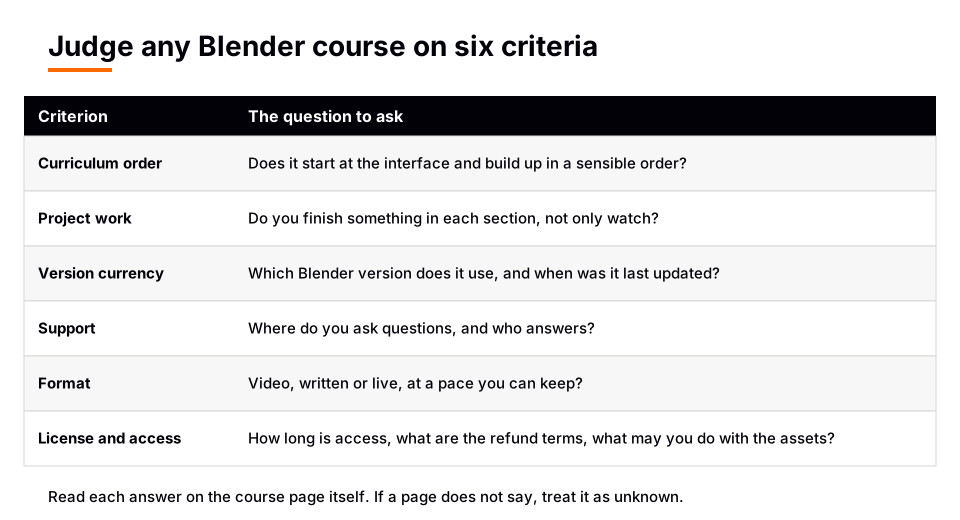
How to judge any Blender course: six criteria
| Criterion | What to look for | Where to check |
|---|---|---|
| Curriculum order | Interface and navigation first, then objects, then modeling, materials, lighting, animation | The lesson list |
| Project work | You finish something in each section, not only watch | Lesson titles, previews |
| Version currency | The Blender version is named and close to the current one | Course page, first lesson |
| Support | A stated place to ask questions and who answers | Course page, help pages |
| Format | Video, written or live, at a pace you can keep | A free sample lesson |
| License and access | How long access lasts, what you may do with included assets, refund terms | The terms and help pages |
Curriculum order. Blender is a large program, and a course that jumps to an advanced topic leaves gaps. The manual's own Modeling introduction says a 3D scene needs at least three components, models, materials and lights, which is a useful skeleton for a syllabus. For modeling in particular, see what to look for in a Blender 3D modeling course.
Version currency. The interface can change between releases, so a lesson recorded in an older version may not match what is on your screen. The current manual is Blender 5.2 LTS, and Blender Studio's Training page lists a course on the material assets introduced for Blender 5.2, an example of training tied to a specific release. Look for a course that names the version it uses.
License and access. Read the terms before you pay: how long access lasts, whether there is a subscription, whether assets in the course can be used commercially, and what the refund terms are. If a page does not say, treat the answer as unknown rather than assuming.
A 10 minute check for any Blender online course
- Find the full lesson list. If you cannot see it before paying, the curriculum question is unanswered.
- Find the Blender version. Compare it with the version you will install.
- Scan for projects. You want finished things, such as a model, a textured object or a rendered scene.
- Find the support route. Is there a place to ask, and does the page say who replies?
- Read the access and refund terms on the course page or the platform's help pages.
- Watch a sample lesson at normal speed. If you cannot follow the pace, the format is wrong for you no matter how good the content is.
- Try the same topic once from the free sources above. If a free lesson already solves your problem, you may not need a course for it.
Which kind fits which goal
| Your goal | A kind that fits | Why |
|---|---|---|
| I have never opened Blender | A roadmap that starts at zero, or a beginner level course | Order matters most when everything is new |
| I need one tool explained | The Blender Manual | It documents each tool and panel |
| I want production style training | Blender Studio training | Its page lists courses, workshops and production lessons |
| I want one instructor's full video series | A standalone video course | It is built as a single series. The Launchpad is not original video |
None of these excludes the others. Many learners use a structured path for order and the manual for detail. For how long this takes, see how long it takes to learn Blender.
Learn this in order with The Blender Launchpad
If your problem is "what do I learn next," The Blender Launchpad is built for that. It orders hand picked, free YouTube lessons into six stages, from Blender basics through hard surface modeling, UV and PBR texturing, studio lighting and rendering, animation, and Geometry Nodes. A Geometry Nodes Launchpad with eight modules is included.
Three bonuses come with it: niche and portfolio building, LinkedIn branding, and 1,000+ CC0 assets, HDRIs and textures that are free for commercial use. You use it in a members app, and you pay once with no subscription. To be clear about what it is: the lessons are existing free YouTube videos that we put in order, not videos we recorded.
Questions people also ask
What is the best Blender online course?
No single course is best for everyone. Choose by your goal and judge each candidate on curriculum order, project work, version, support, format and access terms. A course that scores well on those six is a good candidate.
Is there a Blender 3D online course from Blender itself?
Blender Studio's Training page says it offers courses, workshops and production lessons, including a beginner level course tagged for modeling on the day we read it. That page does not state its access terms, and the Tutorials page on blender.org describes Blender Studio as a paid subscription.
Are free Blender courses enough?
Free lessons are easy to find, but they do not come in a guaranteed order. Our comparison of free and paid Blender courses covers when structure is worth paying for.
How do I know a Blender course is up to date?
Check that it names the Blender version, then compare the tool locations in a sample lesson with the current manual (5.2 LTS). If the version is not stated, ask the instructor or look for the date of the last update on the course page.
How we checked this
We read these pages on November 4, 2026: the Blender Studio Training page (studio.blender.org/training), the Tutorials page on blender.org, and the Blender Manual (5.2 LTS) Modeling introduction. We did not review, rate or price any third-party course, and we make no claim about any specific standalone course. The six criteria and the 10 minute check are our own editorial advice, not statements from those pages. We did not run Blender while writing this.