The best way to learn Blender is to follow one ordered path from the interface to a finished render, use a single project of your own to apply each lesson, and keep the official manual open as a reference. Learning order beats learning speed: each part of Blender builds on the one before it, so a clear sequence saves more time than any single tutorial.
No primary source ranks learning methods, so this guide does not claim a proven winner. It gives you a method based on how the Blender Manual describes the software, and it answers the three searches people type: how to learn Blender, how to learn Blender 3D, and the best way to learn Blender 3D. It uses the Blender 5.2 LTS Manual.
How to learn Blender: the method in six steps
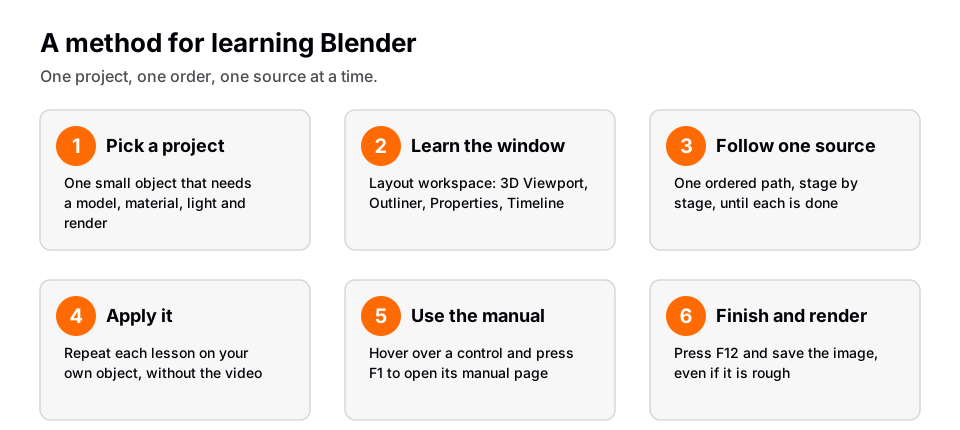
- Pick one small project. A product on a plain background works well because it touches every stage: modeling, a material, light, camera and a render. Write the finish line in one sentence.
- Learn the window first. The manual says the interface has three parts: the Topbar, the Areas in the middle and the Status Bar at the bottom. Open the Layout workspace and find the 3D Viewport, Outliner, Properties editor and Timeline. After this you should know where each kind of setting lives.
- Follow one ordered source at a time. Pick a path and stay on it until a stage is done. Switching between sources that teach in different orders leaves gaps. The six-stage order below is a safe default.
- Apply every lesson to your project. After a lesson, do the same thing on your own object. If you can only do it while the video plays, you have not learned it yet.
- Use the manual as your reference. Hover over any control and press F1 to open the manual page for it. The manual notes that coverage is not 100% yet, so some buttons show an alert instead.
- Finish and render. Press F12 (Render > Render Image) and save the result. A rough finished image teaches more than a perfect model that never gets rendered.
The order to learn in
The manual's default workspaces list is a decent map: Layout, Modeling, Sculpting, UV Editing, Texture Paint, Shading, Animation, Rendering, Compositing, Geometry Nodes and Scripting. Here is a practical six-stage order drawn from it. For a longer explanation of each stage, see is Blender hard to learn.
| Stage | Workspace or area | What you learn |
|---|---|---|
| 1. Basics | Layout | Navigation, select, move, rotate, scale, undo |
| 2. Modeling | Modeling | Edit Mode and modifiers |
| 3. UV and texturing | UV Editing, Shading | Unwrapping, materials with the Principled BSDF |
| 4. Lighting and rendering | Rendering | Lights, camera, Cycles or EEVEE |
| 5. Animation | Animation | Making properties depend on time |
| 6. Geometry Nodes | Geometry Nodes | Procedural modeling with nodes |
If your goal is a different one, such as sculpting or video editing, the same idea applies: learn the interface, then the workspace for your craft, and bring only the rest as you need it. You do not have to finish all six to make something good.
How to learn Blender 3D, not only the buttons
Learning "Blender 3D" means learning two things at once: the software and the 3D ideas it is built on. The manual says 3D software carries extra technical complexity and jargon. It names UV maps, materials, shaders, meshes and subdivs as the media of the digital artist, and says that understanding them, even broadly, helps you use Blender to its best.
So learn each term when you meet it, and tie it to something you can see. A mesh is the surface you edit in Edit Mode. A material and its shader decide how light reacts to that surface. A UV map decides how a flat image wraps onto it. The manual also says that great artists learn subjects like anatomy, composition, lighting and animation principles, so spend some time looking at real photographs of your subject and noticing how light falls on them. That is the part no menu teaches.
Choosing your sources
You have four kinds of material to choose from, and they do different jobs. Use the manual for lookup, one ordered source for learning, and the community for questions.
- The manual. Accurate, current and free, but its About page says it serves more as a reference than a course. Use it when you need the exact name of a setting.
- Video lessons. The manual notes there are many online video tutorials from specialized websites. The Blender website's tutorials page says the most up-to-date tutorials are found on social media under the hashtag #b3d and points to Blender Studio for professional training.
- A structured course. It adds order and a finish line. We compare free and paid routes in free Blender course vs a paid one.
- Community help. The Blender support page lists Blender Stack Exchange and the Blender Artists forum as places to ask.
Check which Blender version a lesson uses. The manual says a new stable release arrives roughly every three months and Long-term Support releases every year, so menus can differ between a recent video and your install. If you are comparing structured courses, see our look at the best Blender courses.
Habits that help
- Experiment freely. Ctrl+Z undoes and Shift+Ctrl+Z redoes, and F9 opens Adjust Last Operation so you can change the parameters of what you just did.
- Keep the cursor in the right editor. Many shortcuts depend on where the mouse is. If a key does nothing, move into the 3D Viewport first.
- Practice regularly. No source gives a required number of hours, but regular short sessions make shortcuts stick. For timing expectations read how long it takes to learn Blender.
- Save versions. Save your file before trying something risky.
Learn this in order with The Blender Launchpad
The method above needs a sequence you can trust, and building one from scratch is the slow part. The Blender Launchpad is a members app with a roadmap of hand picked, free YouTube lessons in six stages: Blender basics, hard surface modeling, UV and PBR texturing, studio lighting and rendering (Cycles and EEVEE), animation, and Geometry Nodes. The Geometry Nodes Launchpad inside it has eight modules.
Stage 1 assumes you have never opened Blender. It is a curated playbook, not original video lessons, so the value is the order and the filtering rather than new footage. It also includes three bonuses: niche and portfolio building, LinkedIn branding, and 1,000+ CC0 assets, HDRIs and textures free for commercial use. One payment, no subscription.
Questions people also ask
What is the best way to learn Blender?
Follow one ordered path from the interface to a render, apply each lesson to your own project, and use the manual as a reference. No primary source ranks methods, so this is a method rather than a proven winner.
How do I learn Blender as a complete beginner?
Start in the Layout workspace and learn navigation, selecting, transforming and undo before anything else. The manual says a few hours of practice can make you familiar with Blender.
How do I learn Blender 3D?
Learn the software and the 3D concepts together: meshes, materials, shaders and UV maps. The manual says understanding these terms, even broadly, helps you use Blender to its best.
What is the best way to learn Blender 3D for free?
Combine the free manual, free video lessons and community forums, and keep to one ordered source at a time. The trade-offs are in our guide to free versus paid Blender courses.
How we checked this
We read these pages on November 4, 2026. We did not run Blender for this article.
- Blender 5.2 LTS Manual: About Blender, Window System Introduction, Workspaces and Help System
- Blender 5.2 LTS Manual: Undo and Redo and Installing Blender
- blender.org: Tutorials and Support