Blender Market is now called Superhive (its page says "formerly Blender Market"), a store where independent creators sell Blender add-ons, models and more. BlenderKit is an add-on with an online library you search from inside Blender, and Poly Haven is a library of free CC0 assets. They overlap on assets but differ in how you pay, so this compares what each one's own pages state.
Everything below comes from each site's own pages, read on November 4, 2026. It is neutral on purpose: we describe what each offers, not who is better, and we did not run any of the add-ons. If you searched for "blendermarket", you are in the right place; the shop's address is superhivemarket.com.
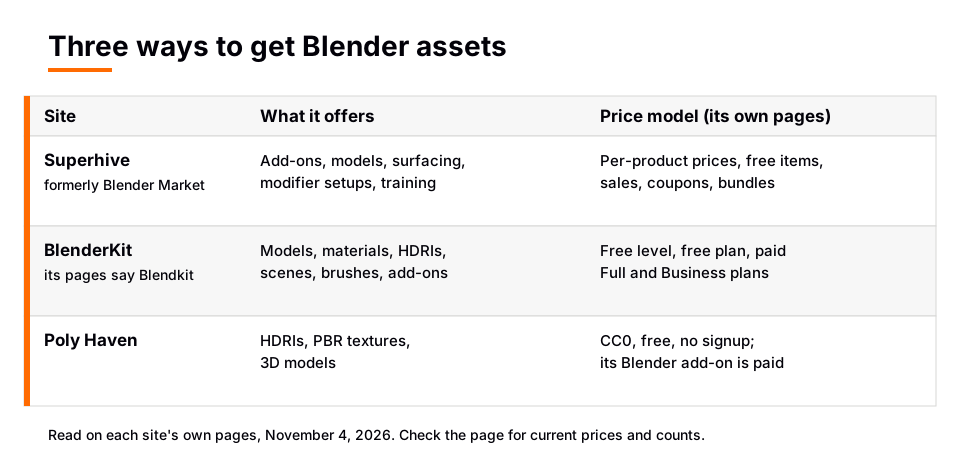
The comparison at a glance
| Site | What it offers | License and price model |
|---|---|---|
| Superhive (formerly Blender Market) | Add-ons, models, surfacing (shaders and textures), modifier setups, render setups and training from independent creators | Per-product prices; free products, sales, coupons and bundles; license meanings are explained in a support article |
| BlenderKit (its pages now say Blendkit) | Models, materials, HDRIs, scenes and brushes, plus add-ons, searched from an add-on inside Blender | Free access to a selection, a free plan, and paid Full and Business plans; add-on is free and open source |
| Poly Haven | HDRIs, textures and 3D models | CC0 and free, no paywalls or signup; its separate Blender add-on is paid for now |
The next sections give the detail and the page each statement comes from.
Superhive (formerly Blender Market)
The Superhive home page describes itself as the place to buy and sell tools for Blender and said it had 72,999 products when we read it. The categories in its menu are Addons, Models, Surfacing, Modifier Setups, Render Setups and Training, plus a Free section, popular items, new arrivals, deals, coupons and bundles.
The page says every product is tested and reviewed by one of its Blender experts for compatibility, licensing, quality and support. It also says creators can automatically donate a percentage of their earnings to the Blender Development Fund, and that the site is made by the people behind CG Cookie.
On price, each product has its own price, and some show a range of prices. The home page does not explain license terms, and the FAQ points to a support article titled "What do the different product licenses mean?", which we did not read. The pages we read do not state Superhive's fee structure for creators.
Sources: Superhive home page
BlenderKit
BlenderKit is covered in detail in our BlenderKit review. In short, its README calls the add-on the official, free, open-source add-on for searching, downloading, uploading and rating assets. The home page lists Models, Materials, HDRIs, Scenes, Brushes, Printables, Add-ons and Node Groups.
The README says you can browse and download a selection of assets without an account, and that a free account lets you bookmark and rate. A Full plan opens the larger library. The pricing page lists Free, Full and Business plans, with recurring payment for Full and Business and prices per month in US dollars. We do not repeat the amounts because the page showed more than one figure per plan. The pages we read did not state one license that covers all assets.
Poly Haven
The Poly Haven home page says it offers HDRIs (16k+ resolution, always unclipped), photoscanned PBR textures (at least 8k resolution) and detailed 3D models. It states the assets are CC0, can be used for "absolutely any purpose without restrictions", and that there are no paywalls or signups. The project relies on donations through Patreon.
The license page says you do not need to give credit, and that the CC0 license covers the assets only, not other site content such as logos, example renders and text. It also says web scraping or data mining needs express permission.
The assets are free, but Poly Haven's Blender add-on (the Asset Browser, which pulls assets into Blender's asset browser) is a different matter. Its plugins page says it is a paid product "for now" and lists $5 per month on Patreon or a $49 once-off purchase on Superhive, as of November 2026. The page says the add-on is released free if the project reaches 5000 patrons.
There is also a "Poly Haven Lite" asset library on extensions.blender.org, published October 8, 2026, with a CC0 license. Its page lists Blender 5.3 and newer, and says it is a lite edition that points to polyhaven.com for the complete collection. For free CC0 sources in general, see free Blender models, free Blender textures and HDRIs for Blender.
Sources: Poly Haven home page · license page
How to choose between them
Choose by the thing you need, not by a ranking:
- You want a specific paid add-on or a themed product pack. Superhive lists add-ons, models, modifier setups and training from independent creators.
- You want to search a large library from inside Blender. BlenderKit's add-on is built for that, with a free level and paid plans.
- You want HDRIs, textures and models with no license worries and no cost. Poly Haven states all its assets are CC0.
- You want assets available offline inside Blender. Poly Haven's plugins page lists offline use as a feature of its paid add-on.
These are not exclusive. Many artists use a free CC0 library for lighting and surfaces, and a marketplace for specific tools. Always read the license on the page of the exact item you download, especially for commercial work.
Skip the node wiring with the Material & Lighting Vault
The three sites above are places to find assets from many creators. The Material & Lighting Vault is a single product with a different purpose: a Blender 5.2+ extension (the Metalight tab in the N panel) with 1,690 procedural materials: 1,000 core materials in 32 categories plus 690 Pro. They work in Cycles and EEVEE, need no UVs by default (a Use UV option exists) and total about 64 MB.
It also has 200 lighting setups that measure the selected objects and build themselves around them (19 categories, tuned for Cycles), 267 studio lights (softboxes, beam profiles, gobos, colored light textures) and 67 weathering presets that work on any material. It is a tool, not a course, with a personal and commercial license, no redistribution and one payment. If you are still learning Blender, The Blender Launchpad is a roadmap of free YouTube lessons, not original video lessons.
Questions people also ask
What is Blender Market now?
The shop is now called Superhive, and its page says "formerly Blender Market". It lives at superhivemarket.com and sells add-ons, models, surfacing, modifier setups, render setups and training from independent creators.
Is BlenderKit free?
Its README says you can browse and download a selection of assets for free, and a free account can bookmark and rate. A Full plan opens the larger library, and the pricing page lists plans.
Is Poly Haven really free?
Its home page says the assets are CC0 and that there are no paywalls or signup required. Its separate Blender add-on is paid for now, according to its plugins page.
Which is best for Blender assets?
That depends on what you need. The pages show Poly Haven is free CC0, BlenderKit searches inside Blender with free and paid levels, and Superhive sells individual products from creators at their own prices.
How we checked this
We read these pages on November 4, 2026: the Superhive home page and FAQ, the BlenderKit README on GitHub with the blendkit.com home, pricing and Get pages, the Poly Haven home, license and plugins pages, and the Poly Haven Lite page on extensions.blender.org. The blenderkit.com address redirected to blendkit.com, which the add-on's own README links to.
We did not run any of the add-ons. We could not confirm Superhive's license definitions, its creator fees, per-asset licenses on BlenderKit, or the supported Blender versions of the Poly Haven Asset Browser, because the pages we read did not state them. Counts and prices on these sites change often, so check the page before you buy.