
A Blender render farm is a group of computers that render the same project together, each taking a share of the frames, so the job finishes sooner than on one machine. You need one when the total render time (frames multiplied by time per frame) is longer than you can wait on the computer you own.
This guide explains how a farm splits work and when that pays off, then covers what Blender's own manual documents: a shared-folder "primitive render farm", splitting a single image by samples, command-line rendering, and Flamenco, a free render manager from the Blender project. We also give a checklist for judging a paid farm, but we name no paid service.
What a render farm is and how it splits work
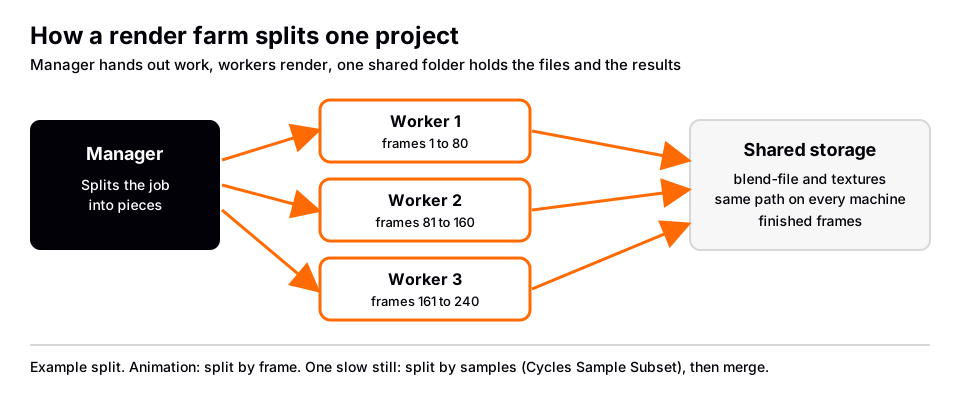
Every farm, home-built or rented, does the same three jobs. It hands out pieces of work, it gives every machine access to the same project files, and it collects the finished images in one place. Blender supports two ways to cut the work into pieces:
- By frame. For an animation, each machine renders different frames. This is the usual way, because frames are independent of each other.
- By sample. For one very slow still image, each machine renders part of the samples of the same frame, and the results are combined afterward. The manual documents this for Cycles as Sample Subset.
A farm does not make a single frame render faster on one machine. It shortens the wait by running many machines at once.
When a render farm is worth it
Estimate before you decide. Render one representative frame at the final settings and note the time. Then:
total time on one machine = number of frames x time per frame
        time on a farm of N similar machines = total time / N, plus setup and file transfer
If the one-machine total fits inside your deadline, you do not need a farm, and better settings may be enough. See how to optimize Cycles renders in Blender and Blender EEVEE vs Cycles, since EEVEE can change the time per frame a lot. If it does not fit, or the machine would be busy for days, a farm makes sense. A single still image rarely needs one, unless it is very large or very heavy.
Build a primitive render farm with a shared folder
The Blender manual describes the simplest farm in a hint on the Output panel page, under the name "Primitive Render Farm". It says an easy way to get multiple machines to share the rendering workload is to:
- Set up a shared directory over a network file system.
- In Output Properties > Output, disable Overwrite and enable Placeholders.
- Start as many machines as you wish rendering to that directory.
The manual gives only the settings, not the mechanics. As we read them, they let each machine skip frames that already have a file, so the machines do not repeat each other's work. This is for animation rendered as an image sequence. For video, the manual advises rendering a set of still images first anyway: if a problem occurs, you restart from the failed frame instead of re-rendering everything. Where those frames are written is covered in where Blender saves renders.
Sources: Output panel page
Split one image across machines (Cycles Sample Subset)
For a single slow frame, the manual's Cycles Sampling page describes Sample Subset in the Advanced settings. Its example splits 2048 samples over two machines:
- On both machines, set Render (Max) Samples to 2048, disable Denoise, and enable Sample Subset.
- On the first machine, set Offset to 0 and Length to 1024.
- On the second machine, set Offset to 1024 and Length to 1024.
- Render on each machine, then combine the two results.
The manual stresses that (Max) Samples must stay at the total across all subsets, otherwise the subsets have incompatible noise and combining them gives a worse result. It combines the images in the Python Console with this call:
bpy.ops.cycles.merge_images(input_filepath1=r"1.exr", input_filepath2=r"2.exr",
                                    output_filepath=r"combined.exr")
Because denoising is switched off for the subsets, plan to denoise the combined image afterward, for example with the compositor's Denoise node, which the manual mentions for renders that include the Denoising Data pass.
Sources: Cycles Sampling page
Render from the command line
Farm software starts Blender without a window. The manual's command line rendering page shows the pattern, with -b to render in the background and -a to render the whole animation using the settings saved in the file:
blender -b file.blend -a
        blender -b file.blend -E CYCLES -s 10 -e 500 -t 2 -a
The second line sets the engine to Cycles, the start and end frames to 10 and 500, and two threads. The manual warns that arguments run in the order given, so put -f or -a last. For a single frame, -f 10 renders frame 10. The arguments page adds a Cycles option, placed after a double dash: --cycles-device accepts CPU, CUDA, OPTIX, HIP, ONEAPI or METAL, and appending +CPU to a GPU device renders on both. Example: blender -b file.blend -f 20 -- --cycles-device OPTIX.
Sources: command line rendering page · arguments page
Flamenco: a free render manager from the Blender project
If a shared folder is too basic, Flamenco is the option the Blender project supports. Its own site (read November 4, 2026) describes it as free and open source render management, released under GPL 3.0, used in production at Blender Studio, cross-platform and self-hosted. It is not built into Blender: you download it and install a Blender add-on.
Its quickstart says you need one or more computers running Flamenco Worker, one computer running Flamenco Manager, and a local network with file sharing, so every computer reaches the same files. In broad terms: download Flamenco, create a shared directory available at the same path on every computer, install Blender in the same place everywhere, run the Manager and its setup assistant, install and configure the add-on with the Manager's address, save your blend-file in the shared storage, and start the job from the Flamenco panel in Output Properties. The site marks Flamenco v3 as in active development.
Sources: Flamenco · quickstart
Before you rent time on a farm
A paid farm runs the same three jobs on its own machines. We did not cite a specific service, so use this checklist against each provider's own pages and compare facts, not slogans:
- Blender version. Does it run the version you made the file in? Also check that your render engine, Cycles or EEVEE, is supported.
- Hardware. Does it render on CPUs, GPUs or both? Your Cycles Device setting and the render nodes need to match.
- Add-ons and external files. The manual's File > External Data > Pack Resources marks eligible external files to be packed into the blend-file on the next save, so the project travels as one file. The manual warns that some heavy files, such as Video Sequencer videos and Movie Clips, cannot be packed.
- Output and cost model. What file format returns, how, and how the provider counts usage. Read the price on the provider's own page on the day you order.
Before you upload anything, render one full-size frame locally. A project that fails on your computer fails on a farm too, after you have waited. Get the basics right first with how to render in Blender and how to render an animation in Blender.
Learn this in order with The Blender Launchpad
A farm multiplies whatever your settings already do. A scene that is too heavy, or a render with the wrong output format, is just as wrong on fifty machines. The skill that saves you time is the one before the farm: setting up lighting, materials and render settings so a frame is fast to render and correct the first time.
The Blender Launchpad is a members app with a roadmap of hand picked, free YouTube lessons in six stages: Blender basics, hard surface modeling, UV and PBR texturing, studio lighting and rendering in Cycles and EEVEE, animation, and Geometry Nodes. Stage 1 assumes you have never opened Blender. It is a curated playbook, not original video lessons, with one payment and no subscription. Its bonuses include niche and portfolio building, LinkedIn branding, and 1,000+ CC0 assets, HDRIs and textures free for commercial use.
Questions people also ask
What is a Blender render farm?
It is a set of computers that render one Blender project together, usually each taking different frames, while sharing the same project files and one output folder.
Does Blender have a built-in render farm?
Not as a ready-made farm. The manual describes a "primitive render farm" with a shared folder, Overwrite off and Placeholders on, and the Blender project supports Flamenco as a separate free render manager.
Can a render farm speed up a single image?
Only by splitting the samples. In Cycles, Sample Subset lets several machines each render part of the samples, and the results are merged with bpy.ops.cycles.merge_images.
Is Flamenco free?
Its own site says Flamenco is free and open source under GPL 3.0, and that you self-host it. You still need the computers and shared storage it runs on.
How we checked this
We did not run Blender or any farm for this guide. We read these pages on November 4, 2026, and wrote only what they confirm:
- Blender Manual (5.2 LTS), read November 4, 2026: Output panel (Primitive Render Farm hint), Cycles Sampling (Sample Subset), command line rendering and arguments, and packed data.
- Flamenco website (flamenco.blender.org), read November 4, 2026: home page and quickstart.
We tried to read the site of a community render farm and it did not load for us, so we name no commercial or community farm and quote no prices. The manual does not explain how Overwrite and Placeholders behave beyond the hint, so our reading of them above is worth testing on a short frame range first.