

"Loading render kernels" is the status Cycles shows while it prepares the render kernels, the program code that runs on your render device, before the first sample is traced. The message itself says it "may take a few minutes the first time", and it is most noticeable on GPU back-ends such as OptiX, HIP, oneAPI and Metal, where kernels may need to be compiled for your hardware.
The Blender manual does not describe this message, so this guide uses what Blender's own sources say: the Cycles source code, the developer documentation, the release notes and the manual's GPU rendering page. Where those sources are silent, for example on how long the wait is, we say so and do not guess.
What Loading render kernels means
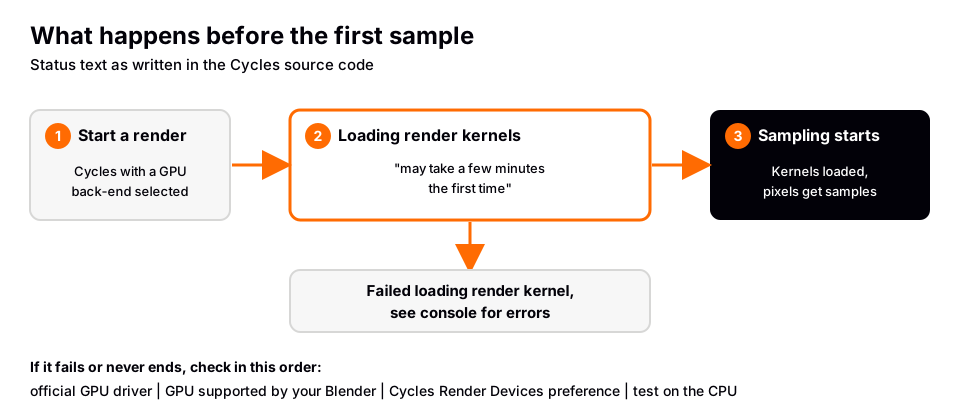
In Cycles, a kernel is a piece of rendering code built for a specific device. The Cycles source (scene.cpp in the official Blender repository, read November 4, 2026 on the development branch) sets the status text "Loading render kernels (may take a few minutes the first time)" when it calls the device to load them. If loading fails, the same function reports "Failed loading render kernel, see console for errors".
Two details from the source help explain the wait. A code comment says the heavy part of loading is kernel compilation, and that it does not depend on the scene. The loading step also logs which features the scene uses, such as subsurface scattering, volumes, the shadow catcher, the portal node and light linking, so the kernels are prepared for the features your scene needs. Another comment says that if the scene changes while kernels are loading, part of the scene update has to be redone.
The message belongs to Cycles. EEVEE is a separate engine, so you will not see it there. For the difference between the two, see Blender EEVEE vs Cycles.
Sources: scene.cpp
Why the first GPU render can be slow
Whether a back-end compiles anything at render time depends on the back-end and on the Blender version. These are the statements we could confirm, with the page each one comes from:
| Back-end | What Blender's pages say | Source and version |
|---|---|---|
| CUDA (NVIDIA) | Blender comes with precompiled kernels, so users do not normally need the CUDA toolkit. A new card that the installed Blender does not support yet can lead to a failed attempt to build a kernel dynamically. | Manual, GPU Rendering, 5.2 LTS |
| OptiX (NVIDIA) | Runtime kernel compilation time was significantly reduced, in many scenes less than a second. | Release notes, Blender 3.0 |
| HIP (AMD) | The new back-end had no runtime kernel compilation, so renders started quickly. | Release notes, Blender 3.0 |
| oneAPI (Intel) | First use of the Ambient Occlusion and Bevel nodes triggered a GPU binaries recompilation that used around 9 GB of memory and took several minutes. | Release notes, Blender 3.6 |
| Metal (Apple) | Kernels are compiled at runtime. Rendering starts with a generic shader while optimized shaders compile in the background, and this can be configured in the preferences. | Developer docs; release notes, Blender 3.5 |
Read the version column carefully. The 3.0, 3.5 and 3.6 notes describe those releases and may no longer match Blender 5.x. The current source code still contains code paths that look for a precompiled kernel and compile one locally when none is found (for CUDA and HIP), and developer documentation says ahead-of-time compilation for Intel GPUs is a build option. We found no current page that states how long compiled kernels are kept, or exactly when Blender rebuilds them, so we do not claim that either.
Sources: Manual, GPU Rendering · Release notes, Blender 3.0 · Release notes, Blender 3.6 · Developer docs · release notes, Blender 3.5
How long it takes
The message says "a few minutes" for the first time, and the oneAPI note above says "several minutes" for one specific case. That is all the official pages we could read give. People report much longer waits in Blender's bug tracker, but the tracker blocked our automated reading, so we cannot quote those threads and we give no typical time. If the wait is much longer than a few minutes, treat it as a problem to check, using the steps below.
What to do when it seems stuck
These steps come from the manual's GPU rendering and preferences pages, in an order that moves from cheap checks to bigger ones.
- Give the first render time and watch the console. Errors are written to the console, as the failure message says. If you started Blender from a terminal, read it there.
- Install the official graphics driver. The manual advises installing drivers from the GPU maker's website, or through the package manager on Linux, because drivers supplied by the computer maker can be outdated or incomplete. It also lists minimum versions: for OptiX a driver version of at least 575, for HIP Radeon Software 24.9.1 or Radeon PRO Software 24.Q4 on Windows, and for Metal macOS 13.0 or newer to support all features. Check the page for your hardware, since the lists change between releases.
- Check that your Blender supports the card. The manual says "CUDA Error: Kernel compilation failed" can happen with a new NVIDIA card that the installed Blender and CUDA toolkit do not support yet, and suggests trying the latest official or daily build.
- Check the device preference. In Preferences > System, under Cycles Render Devices, choose the back-end for your GPU (CUDA, OptiX, HIP, oneAPI or Metal) and enable the devices. Then set the scene to use the GPU Compute device. With several GPUs, enabling one device at a time shows which one is the problem. That last tip is our suggestion, not the manual's.
- Render on the CPU to isolate the cause. Setting the preference to None, or switching the scene away from GPU Compute, makes Cycles use the CPU. If the CPU renders, the GPU back-end is the problem. We could not confirm from the sources how long this status shows on a CPU, since the source sets it before calling any device.
- On Linux with CUDA, read the compiler errors. The manual covers the "Unsupported GNU version" error, with two fixes: use an older compatible GCC through
CYCLES_CUDA_EXTRA_CFLAGS, or remove the compatibility check line inhost_config.h.
The manual's GPU page also lists other GPU problems that look similar from the outside, such as "Out of memory", which usually means the scene does not fit in GPU memory. The note there suggests smaller image textures. Once rendering starts, how to optimize Cycles renders in Blender covers speed, and how to make Blender renders higher quality covers the quality settings.
Learn this in order with The Blender Launchpad
Render errors are easier to fix when you know what each part of the pipeline does: the engine, the device, the sampling and the output. Most people pick that up in pieces from scattered videos, and then a message like this one feels like a roadblock instead of a status.
The Blender Launchpad is a members app with a roadmap of hand picked, free YouTube lessons in six stages: Blender basics, hard surface modeling, UV and PBR texturing, studio lighting and rendering in Cycles and EEVEE, animation, and Geometry Nodes. Stage 1 assumes you have never opened Blender. It is a curated playbook, not original video lessons, so the lessons stay free and you follow them in order. It is a single payment with no subscription. If you are working through your first renders, how to render in Blender is a good companion.
Questions people also ask
What does Loading render kernels mean in Blender?
It is the Cycles status shown while it loads, and where needed compiles, the render kernels for your device. The status text says it may take a few minutes the first time.
Is it only slow the first time?
The message says the first time is the slow one. We could not find an official page that says how long compiled kernels are kept or what makes Blender rebuild them, so we cannot promise that later renders will always be fast.
How long does Loading render kernels take?
The official pages we read say "a few minutes" for the first time, and "several minutes" for the oneAPI Ambient Occlusion and Bevel case in Blender 3.6. They give no other times.
Can I skip loading render kernels?
The manual describes no way to skip it. To check whether your GPU back-end is the cause, render on the CPU. Updating to the official driver from your GPU maker is the documented first fix when the wait never ends.
Why does Blender say Failed loading render kernel?
That is the error text Cycles uses when the device could not load its kernels. It points you to the console, where the specific error is printed.
How we checked this
We did not run Blender for this guide. We read these pages on November 4, 2026, and wrote only what they confirm:
- Blender Manual (5.2 LTS), read November 4, 2026: GPU Rendering and System preferences.
- Blender developer documentation, read November 4, 2026: Cycles GPU binaries, and the Cycles release notes for 3.0, 3.5 and 3.6.
- Blender source code (official GitHub repository, development branch), read November 4, 2026: the Cycles scene and session files that set and use the status text, and the device files for CUDA, HIP, OptiX, Metal and oneAPI.
We could not confirm typical wait times, how long compiled kernels persist, or the behavior on Blender 5.x for each back-end, because the manual does not document them and the Blender bug tracker blocked our automated reading. The release-note statements above describe Blender 3.x and may have changed.