A 3D artist portfolio is a small set of finished projects in one specialty, each shown with a strong hero image, close-ups and a short breakdown of how you made it, hosted on a page employers and clients can find. The U.S. Bureau of Labor Statistics (BLS) says employers look for workers who have a good portfolio of work, so the portfolio is the part of the job search you control.
This guide covers what to put in a 3D artist portfolio, how to structure each project, how to export images for the web, and the hosting options, described by what their own pages say. We use primary sources only. Where we give advice that no source states, such as how many projects to start with, we label it as our suggestion.
What the primary sources say about portfolios
The BLS Occupational Outlook Handbook page for Special Effects Artists and Animators, last modified October 29, 2026, says employers look for workers who have a good portfolio of work, and that the typical entry-level education is a bachelor's degree in computer graphics, art or a related field. It also says skills in graphics and animation can be honed through self-study, and that developing those skills can enhance a portfolio and may make it easier to find job opportunities.
Two more lines matter if you are going the self-taught route. The BLS says many artists and animators put their creative work on the Internet, and that if the images become popular they can gain recognition, which may lead to future employment or freelance work. And it reports that 63% of the occupation was self-employed in 2025, which means a portfolio is often a sales page for freelance clients as much as a job application. For the numbers in context, see 3D artist jobs.
The BLS does not publish what a portfolio must contain, how many pieces it needs, or how long reviewers look at one. Anything on those points below is general craft advice.
What to show in a 3D artist portfolio
The BLS lists artistic talent, with a good understanding of color, texture and light, and computer skills among the important qualities. A portfolio is how you demonstrate those without being asked. This is our advice, not a rule from a source:
- Pick one specialty. A portfolio about hard surface models, product visuals, environments or characters is easier to judge than one that tries to be everything. If you are not sure which, look at a few postings for roles you would want and note what they ask for. Our entry level 3D artist jobs guide goes further on this.
- Show finished pieces. A finished piece includes modeling, materials, lighting and a final render, all in one image. A half-textured model shows less than one polished render.
- Start small. Our suggestion is three to five strong projects. A short portfolio of your best work beats a long one with weak pieces in it.
- Show your thinking. ArtStation's help center says artwork that includes breakdown shots generally gets more views and likes. Breakdowns also show a reviewer that you understand the pipeline.
- Match your target. If you want product visualization work, show product renders with clean lighting. Our 3D rendering workflow for product visualization is one example project path. If you want hard surface work, show models and the topology behind them.
Leave out tutorial follow-alongs presented as your own design, and anything that is not up to the standard of the rest. One weak piece can weigh down the strong ones.
How to structure each project page
Treat every project as a short page with the same parts, so a visitor knows where to look. Here is a layout that works for most 3D projects.
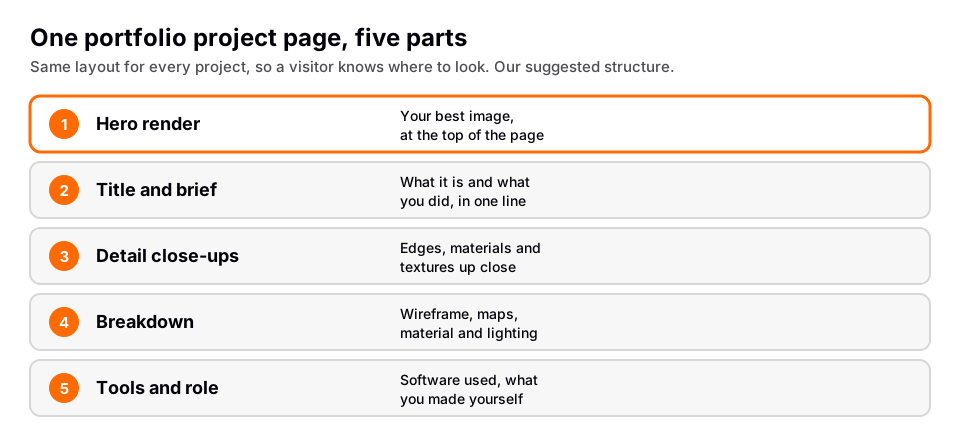
- Hero render first. Put your best image at the top, so the first thing a visitor sees is your strongest work.
- Title and a one-line brief. Say what it is and what you did: for example, a product render from a reference photo, or a hard surface prop from a concept.
- Detail close-ups. Crops that show edge bevels, material response and texture detail. They prove the quality holds up near.
- Breakdown. Show the model without its materials, the UV or texture maps if relevant, the material setup and the lighting setup. ArtStation notes its projects support multiple images, animated GIFs and video, so a breakdown can be a short loop as well as stills.
- Tools and role. List the software, for example Blender, and say which parts you made yourself. This matters if you used a free model, texture or HDRI. Poly Haven's license page says its assets are CC0 and can be used for any purpose, including commercial work, without credit, but you still need to be clear in the project what you modeled and what you did not.
If you use Blender, render the breakdown views from the same camera as the hero image so the comparison is easy to read. The Blender Manual's About page says Blender supports the entire 3D pipeline, from modeling and rendering to compositing, so you can produce most breakdown material inside one program.
Export your images for the web
Good work can look worse online if you export it carelessly. ArtStation's help article on image quality, dated August 7, 2026, gives specific guidance:
- Use the export feature in your image editor instead of Save As. For Photoshop it names File ‣ Export ‣ Export As. It says Save As stores metadata and color profile information that can shift colors on the web.
- Convert to sRGB and do not embed the color profile. It says web images should generally be sRGB with no metadata.
- Resize first, then export without resizing, so anti-aliasing does not blur fine detail.
- Images must be larger than 400 by 400 pixels, smaller than 10,000 by 10,000 pixels and under 10 MB, or they will not upload.
It also says ArtStation converts images to JPG at 90% quality at 1920 pixels wide, and sends 4K if you have a 4K monitor and the image is available. That is ArtStation's behavior, not a general web rule.
From Blender, the manual says still renders are not saved automatically; you save them from the Image Editor. It recommends PNG for on-screen output and JPEG where file size matters and some quality loss is acceptable. The manual's color management page says sRGB works for all computer displays, and that Save As Render applies the render's view and display transform to display formats like PNG. See how to render in Blender if you have not saved a render yet.
Where to host a 3D artist portfolio
You do not need only one place. These are the options below, described only by what each one's own page says when we read it on November 4, 2026. We do not rank them, and we do not quote prices.
| Option | What its own pages say | Worth knowing |
|---|---|---|
| ArtStation | Help center covers a Portfolio Manager, projects, albums and collections, plus a Website Builder for custom portfolio websites hosted on ArtStation, with custom domain guides. | Album visibility choice is listed for Premium accounts. Check which features your account level has. |
| Behance | Its About page says to share your work and grow your career. It lists setting availability for freelance and full-time work, listing services, and showcasing work on a profile. It lists a customized Adobe Portfolio website under Behance Pro. | Read its current plan terms yourself before relying on a feature. |
| Sketchfab | Its homepage describes sharing and embedding 3D models online and showcasing your work. Its help center has export guides including Blender, and a Supported 3D File Formats article. | It shows a model people can rotate, not a flat render. Good as an addition for hard surface or product models. |
| Your own site on GitHub Pages | GitHub Docs says Pages is a static site hosting service that publishes HTML, CSS and JavaScript from a repository, and that you can use a custom domain. | It is hosting only. You build the pages, and it is available for public repositories on GitHub Free. |
A reasonable setup, which is our suggestion: keep one main portfolio where the full projects live, and link to it from every other profile, including your LinkedIn page. A single link is also easier to put on an application. If you have your own domain, point it at your main portfolio so the address does not change if you move platforms.
ArtStation's visibility guidance applies to any platform with search: complete your profile including skills and software, and add the medium, subject matter, software and tags to each project. It also says publishing consistently over time and engaging with other artists are signs of success on its network.
A build order that works
- Choose your specialty from real postings, not from habit.
- Make one project all the way to a final render before starting a second one. You should end with a hero image you would show to a stranger.
- Write the project page with the five parts above. Include the breakdown while you still remember the settings.
- Publish to one host and check it on your phone and on a different browser. Check that images are sharp and colors look right.
- Repeat until you have three to five projects, then link the portfolio from your LinkedIn profile and your applications.
- Replace your weakest piece whenever you make something better.
After step 2 you should have something real to show. If a piece does not reach that bar, finish it before starting anything new.
Learn this in order with The Blender Launchpad
The skills in a portfolio come from a sequence: modeling, materials, lighting, rendering. The Blender Launchpad is a members app with a roadmap of hand picked, free YouTube lessons in six stages: Blender basics, hard surface modeling, UV and PBR texturing, studio lighting and rendering with Cycles and EEVEE, animation, and Geometry Nodes. Stage 1 assumes you have never opened Blender.
It includes a bonus section on niche and portfolio building, which is where the choosing-a-specialty step above gets worked through, and a bonus on LinkedIn branding. A third bonus is a library of 1,000+ CC0 assets, HDRIs and textures that are free for commercial use. It is a curated playbook, not original video lessons, and it does not place you in a job. It is one payment with no subscription.
Questions people also ask
What should a 3D artist portfolio include?
A few finished projects in one specialty, each with a hero render, close-ups and a breakdown, plus a short bio and contact link. The BLS says employers look for a good portfolio; it does not publish a required list.
How many projects does a 3D portfolio need?
No source we read states a number. Our suggestion is three to five strong projects, replacing the weakest as you improve.
Do I need my own website for a 3D artist portfolio?
No. ArtStation, Behance and Sketchfab each say on their own pages that they let you show your work, and ArtStation also offers a website builder. A personal site gives you control of the address, which some artists prefer.
Can a beginner build a 3D artist portfolio?
Yes. The BLS says skills in graphics and animation can be honed through self-study and used to enhance a portfolio. Start with one finished project and show your process.
Is Blender work accepted in a portfolio?
The portfolio shows the result, and Blender is a full 3D package per its manual. Employers list their own required software, so read the postings and show finished work with the tools they name where you can.
How we checked this
We did not run Blender for this guide. We read these pages on November 4, 2026, and wrote only what they state. Advice marked as ours is general craft guidance, not a source's claim.
- U.S. Bureau of Labor Statistics, Occupational Outlook Handbook: Special Effects Artists and Animators (last modified October 29, 2026).
- ArtStation Help: best quality of images, more visibility for your work, organizing projects into albums, and the Portfolio and Website Builder collections.
- Behance: About.
- Sketchfab homepage and its 3D Software Export Guides.
- GitHub Docs: What is GitHub Pages?
- Blender Manual 5.2 LTS: About Blender, Output panel, Supported Image Formats and Displays and Views.
- Poly Haven license.
No source we read publishes how many projects a portfolio needs or how long reviewers spend on one, so this guide gives none. We could not load ArtStation's marketing pages, so we describe only its help center.