The main advantages of 3D product visualization for e-commerce are a consistent look across a catalog, new variants without a new photo shoot, and one 3D model that can be reused for images, web 3D viewers and augmented reality (AR). Shopify and Google both say 3D and AR product views help shoppers see and understand a product, but neither publishes a sales or conversion number, and neither do we.
This guide goes through each advantage, names the primary source behind it, and says where a source is a vendor describing its own tool. It also covers product 3D visualization for e-commerce in practice: the file formats Shopify, Google and Apple use, and what Blender can export. If you want the basics first, read what 3D product visualization is. Where no primary source gives a number, we give none.
The advantages, and what backs each one
| Advantage | What the source says | Number published? |
|---|---|---|
| Consistent look | Blender Manual: what a render looks like is defined by cameras, lights and materials | No |
| Variants without a new shoot | KeyShot (vendor page): scale a product range, sizes, flavors and variants from a single scene without re-shooting | No |
| One model, several outputs | Blender Manual: renders, glTF (.glb) and USD/USDZ export | No |
| Better shopper understanding | Shopify Help: a better sense of size, scale and detail; can increase confidence | No |
| Interactive and AR views | Google Merchant Center and Apple AR Quick Look pages | No |
We read every page named here on November 4, 2026. The sections below take the advantages one at a time.
1. A consistent look across products
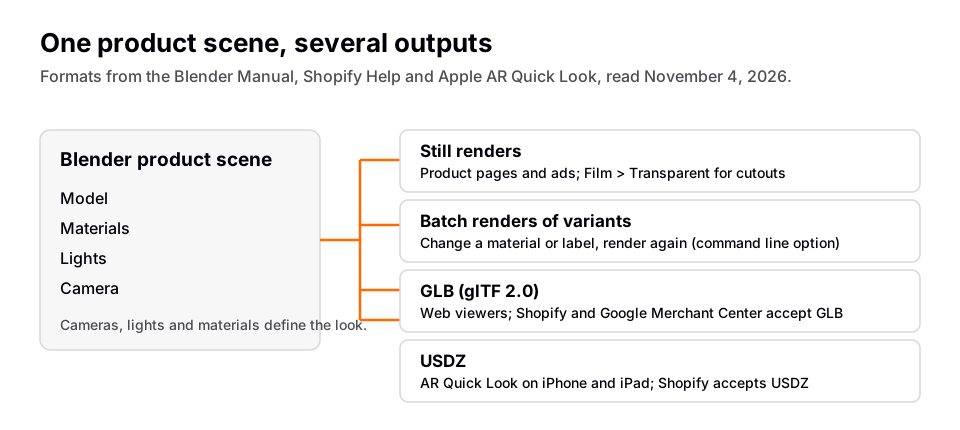
The Blender Manual (5.2 LTS) says what the render looks like is defined by cameras, lights and materials, and that these are shared between the EEVEE and Cycles render engines. That is the mechanism behind consistency. When the lights and camera sit in a saved scene, every product you place in it is lit and framed the same way, which is harder to repeat across separate photo shoots. That last step is our reasoning from the manual, not a claim the manual makes, and no source we read measures how much consistency matters to shoppers.
For catalog images on a plain background, Cycles has a Film ‣ Transparent setting. The manual says it renders the background transparent so you can composite the image over another background afterward.
2. Variants without a new photo shoot
KeyShot's packaging page says you can scale a full product range, including sizes, flavors and variants, from a single scene without re-shooting, and swap labels and artwork for updated visuals. That is a vendor describing its own product, not an independent finding. The idea carries to other tools: once the model and scene exist, changing a color, label or material and rendering again is software work, not a new photo shoot.
In Blender, the manual says you can render from the command line without a graphical display, and that this suits scripts. For example, blender -b file.blend -f 10 renders frame 10 of a file in the background. Scripting a batch of variants is possible with that, but the manual does not describe a product-variant workflow, so treat it as an option to test.
3. One model, several outputs
The same model can feed stills, animations and files for web viewers and AR. Blender's glTF 2.0 add-on, enabled by default, is found at File ‣ Import/Export ‣ glTF 2.0 (.glb, .gltf). The manual says glTF is used for transmission and loading of 3D models in web and native applications and reduces the size of models and the work needed to display them. Blender can also export to USD, and the manual says setting the output extension to .usdz produces a USDZ package, a zip archive of the USD and its textures.
4. Shoppers can inspect the product
Shopify's help page on 3D media says 3D models give customers a better understanding of a product's function and size, and that they increase customers' confidence in the quality of products. Its page on media types says the models use the device's camera and screen to show the product in the customer's environment. Google's Merchant Center help says 3D models let customers view products from different angles on free listings, and that AR lets them see a product in their own space. Google adds that 3D and AR products often have strong customer engagement. That is a qualitative statement; the page gives no figure.
Product 3D visualization for e-commerce: what the platforms accept
- Shopify. Its page on product media types lists GLB and USDZ as accepted 3D file types, says uploads are converted so both versions exist for Android and iOS, gives a file size limit of 500 MB, and says files over 15 MB are automatically optimized. Another Shopify page says your online store needs a theme that supports 3D models, and that all Online Store 2.0 themes built by Shopify do.
- Google. Merchant Center takes a 3D model through the
virtual_model_linkattribute, a URL to a glTF or GLB file. Google recommends a 10 MB file and says it should not exceed 15 MB. It says new models may take up to 2 weeks to appear. Its two help pages we read differ on categories and markets (one says home goods and shoes in the US, CA, AU, JP and IN, the other says the US), so check the live page for your product. - Apple. Apple's AR Quick Look page says Safari, Messages, Mail, News and Notes use Quick Look to show USDZ files on iPhone, iPad and Apple Vision Pro, that a visitor taps an object in Safari and then the AR icon, and that it requires iOS 12 or iPadOS 12 or later. Mac users download the USDZ file instead.
What no source measures
None of the pages above publishes how much 3D raises conversion, lowers returns or saves compared with photography. Shopify and Google use words like confidence and engagement, with no percentages. If you see a precise figure on a blog, ask for the primary source. We found none for conversion, returns, production cost or time saved, so this guide states none.
Limits and costs to plan for
- You still need a model. Google's page says to create the 3D model yourself or with a partner. Building one takes skill and time, and no source gives a typical time.
- Exports change the model. Blender's manual says glTF converts quads and n-gons to triangles, and that curves and other non-mesh data are not preserved, so convert them to meshes before export. Image textures must be PNG or JPEG, and the add-on converts other formats, which adds export time.
- USD export has limits. The manual says Blender does not yet support exporting invisible objects, USD layers or variants.
- Platform rules apply. Google says reviews can take up to 2 weeks and that AR is not yet supported in Shopping ads. Features can be limited by market.
- Some products still suit a photo. No source we read says 3D replaces photography entirely, and we do not claim it.
How to start
The workflow is model, material, light, camera, render, then export for web or AR. 3D rendering for product visualization covers the render step, and 3D product visualization software compares the tools. If you want to sell the service rather than use it in a store, see how to start a product visualization studio, and for the job market, 3D artist jobs.
Learn this in order with The Blender Launchpad
These advantages all depend on the same skills: clean models, believable materials, lighting and a final render. The Blender Launchpad is a members app with a roadmap of hand picked, free YouTube lessons in six stages: Blender basics, hard surface modeling, UV and PBR texturing, studio lighting and rendering in Cycles and EEVEE, animation, and Geometry Nodes. Stage 1 assumes you have never opened Blender. It is a curated playbook, not original video lessons.
Its bonuses include niche and portfolio building, LinkedIn branding, and 1,000+ CC0 assets, HDRIs and textures that are free for commercial use. It does not promise clients or income. It is one payment with no subscription.
Questions people also ask
What are the advantages of 3D product visualization?
A consistent look from a saved scene, new variants without a new photo shoot, and one model reused for stills, web 3D and AR. Shopify and Google say 3D views help shoppers understand a product, without giving figures.
Does product 3D visualization increase sales?
No primary source we read publishes a sales or conversion figure. Shopify says 3D models can increase customer confidence, and Google says 3D and AR products often have strong engagement.
What file format does 3D product visualization for e-commerce use?
Shopify accepts GLB and USDZ, Google's 3D model attribute takes glTF or GLB, and Apple's AR Quick Look uses USDZ. Blender exports glTF 2.0 (.glb) and USD, including .usdz.
Does 3D replace product photography?
No source we read says so. KeyShot's page says variants can be produced from one scene without re-shooting, which is narrower than replacing photography.
How we checked this
We read these pages on November 4, 2026. We did not run Blender for this article. KeyShot is a vendor page, cited as a vendor statement.
- Blender Manual 5.2 LTS: Rendering Introduction, Cycles Film, Rendering From The Command Line, glTF 2.0 and Universal Scene Description
- Shopify Help: Product media types and Shopify Help: 3D media
- Google Merchant Center Help: Display your products in 3D and augmented reality and Google Merchant Center Help: 3D model link
- Apple Developer: AR Quick Look
- KeyShot: Packaging (vendor page)