
To start a product visualization studio as a freelancer, choose a short list of services (still renders, transparent-background cutouts, turntable animations), write down exactly what each job delivers, and run every project through the same process from brief to final files. The tools can be free: Blender's license page says what you create with it is your sole property and can be used commercially.
This guide covers services, deliverables, a repeatable process, licensing, business basics and where clients come from. We make no income claims, no client-count claims and no market-size claims, because the primary sources do not publish them. Advice that no source states is labelled as our suggestion.
What a 3D product visualization studio is, for a freelancer
A studio can be one person. The U.S. Bureau of Labor Statistics (BLS), in its Occupational Outlook Handbook page for Special Effects Artists and Animators (last modified October 29, 2026), reports that 63% of the occupation was self-employed in 2025, and that many artists put their creative work online, which may lead to future employment or freelance work. That figure covers the whole occupation, not product visualization alone, and the BLS does not break out product visualization.
So "studio" here means a repeatable offer, not an office. If you are new to the field itself, start with what 3D product visualization is, then come back.
Services a studio can offer
For 3D product visualization services, the clearest primary source is how software vendors describe the work. KeyShot's pages, read November 4, 2026, list product rendering, animations (turntables, exploded views and camera flythroughs), exploded views, and web and marketing exports such as GLB and USD for e-commerce and AR. Its packaging page lists pack shots, e-commerce imagery, shelf scenes, rendering every SKU from one file, and swapping labels and artwork for updated visuals. These are one vendor's descriptions of what its tool is used for, not a market survey. They are a useful menu all the same.
Turned into freelance offers, with Blender as the tool, they look like this. The grouping is our suggestion.
- Hero stills: one polished image of a product on a studio backdrop or in a simple scene.
- Cutouts: product renders on a transparent background, for catalogs and web stores.
- Variants: the same product in several colors, finishes or labels from one scene file.
- Turntables: a rotating animation of the product.
- Explainer views: exploded or cutaway images that show how a product is built.
Start with two or three. A narrow service list is easier to price, to explain on a portfolio page and to do well. Our 3D rendering workflow for product visualization covers the Blender steps behind the first two.
What each job delivers, and how Blender makes it
Write the deliverables into every quote so the client and you agree what "done" means. This table pairs common deliverables with the Blender 5.2 LTS setting that produces them.
| Deliverable | How Blender makes it | Check |
|---|---|---|
| Still image | Render with F12, then save from the Image Editor; PNG is the manual's pick for on-screen output | Resolution X and Y in Output Properties ‣ Format |
| Transparent cutout | Render Properties ‣ Film ‣ Transparent, then save a format with alpha, with Color set to RGBA | PNG supports alpha per the manual's format table; JPEG does not |
| Layered or editable file | Multi-Layer EXR in the Output panel's Media Type | The manual recommends OpenEXR for compositing and color grading |
| Turntable or other animation | Render an animation; the Output panel's Media Type can be Image or Video | Frame rate and range in the Format and Frame Range panels |
| Source scene | The .blend file | The license page says .blend files you create are yours to use as you like |
Whether to hand over the source scene is a business decision, not a technical one. Decide it before you quote, and say so in the agreement. The Blender license page says your artwork belongs to you; it does not decide what you promised a client.
Color deserves a line in the brief. The manual describes the Khronos PBR Neutral view transform as designed so sRGB output colors match the input base colors as faithfully as possible under gray-scale lighting, aimed at product photography. If a client's brand color matters, test the view transform on their color before you deliver.
A repeatable brief-to-delivery process
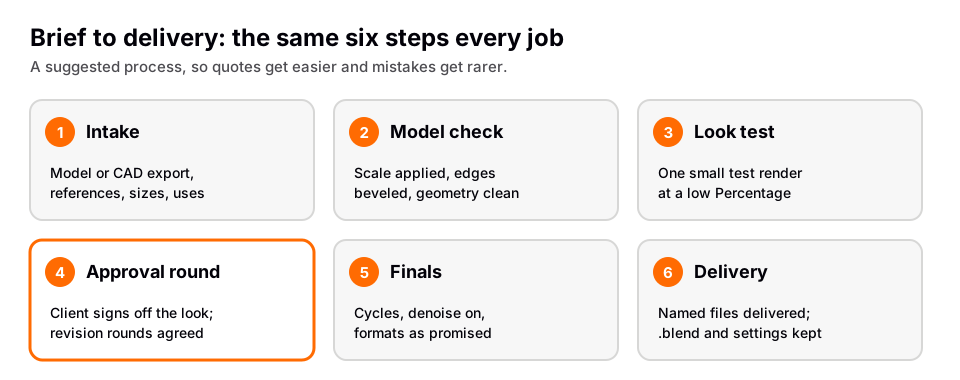
The following is our suggested process, not a source's. Its value is that you do the same thing every time, so quotes get easier and mistakes get rarer.
- Intake. Collect the 3D model or CAD export, reference photos, the finishes and colors, the real dimensions, where the images will be used and the sizes you need to deliver. The manual's import list includes USD, OBJ, FBX and others, but native CAD formats may not be among them, so ask the client which formats they can export before you agree to a date.
- Model check. Confirm scale and apply it, check for missing geometry, and add bevels where hard edges need to catch light. See how to bevel in Blender.
- Look test. Set up materials and lights, then render one small test. The Format panel's Percentage slider exists for small test renders that keep the final proportions. Send it for approval before you spend time on finals.
- Approval round. Agree in writing how many revision rounds the quote includes. How many is a business choice, not something a source can tell you.
- Finals. Render at full resolution with Cycles, denoising on, and save in the formats you promised.
- Delivery and archive. Send a clearly named set of files, and keep your .blend file and a record of the settings so a repeat order is quick.
Licensing the assets you use
Client work depends on knowing what you may use. Blender is licensed under the GNU GPL, and its license page says that what you create with it is your sole property and free to use as you like, including commercially. For environment lighting and extra assets, Poly Haven's license page says all its HDRIs, textures and 3D models are CC0, can be used for any purpose including commercial work, and need no credit. Any other asset, such as a model you bought or downloaded, has its own license, so read it before it goes into a client scene.
Business basics you cannot skip
We are not legal or tax advisors, so we point you to the official starting points. The U.S. Small Business Administration's business guide lists steps for launching a business, among them choosing a business structure and name, registering the business, getting federal and state tax ID numbers, applying for licenses and permits, opening a business bank account and getting business insurance. Its managing section covers finances and paying taxes. The IRS's self-employed individuals tax center says it has information on self-employment, including when and how to file a federal return and make estimated payments. These pages cover the United States; elsewhere, use your own country's equivalents.
Finding clients
No source we read publishes how many clients a freelancer can expect or how to win them. What the sources do say is modest and practical:
- The BLS says putting creative work on the Internet may lead to recognition and freelance work.
- Behance's About page lists, among its features, setting your availability for freelance and full-time work, listing the services you would like to offer, and showcasing your best work on your profile.
- ArtStation's help center says to complete your profile with skills and software and to add medium, subject and software tags to projects, to increase discoverability to potential clients, recruiters and fans.
Build a portfolio first. Our guide to a 3D artist portfolio covers what to show, and freelance 3D artist jobs covers where freelance work is listed.
What the sources do not say
The BLS notes that its Pay tab does not include pay for self-employed workers, because the survey behind it does not collect those data. That means there is no official earnings figure for a freelancer here, and we give none. The sources we read also publish no prices for visualization services, no demand figures for this niche and no typical project length. If someone quotes you such numbers as facts, ask for their primary source.
Learn this in order with The Blender Launchpad
Services are only as good as the skills behind them. The Blender Launchpad is a members app with a roadmap of hand picked, free YouTube lessons in six stages: Blender basics, hard surface modeling, UV and PBR texturing, studio lighting and rendering with Cycles and EEVEE, animation, and Geometry Nodes. Those stages match the work above, from clean models to materials, light and animation for turntables.
Its bonuses include niche and portfolio building and LinkedIn branding, which line up with choosing a short service list and presenting it, plus 1,000+ CC0 assets, HDRIs and textures that are free for commercial use. It is a curated playbook, not original video lessons, and it does not supply clients. It is one payment with no subscription.
Questions people also ask
How do I start a product visualization studio?
Choose two or three services, define what each delivers, build a portfolio of finished pieces, and use one process for every job. Then handle the business basics for your country, such as registration, taxes and insurance.
What is a 3D product visualization studio?
It is a business that produces images or animations of products from 3D models. For a freelancer it can be one person; the BLS reports 63% of the broader occupation was self-employed in 2025.
What are 3D product visualization services?
Vendor pages describe product renders, turntable and exploded-view animations, pack shots and e-commerce images, and exports for web and AR. A freelance studio typically offers a subset of these.
Can I use Blender for paid client work?
Yes. Blender's license page says what you create is your sole property and can be used commercially. Check the license of any assets, such as HDRIs or models, that you add.
How we checked this
We did not run Blender for this guide. We read these pages on November 4, 2026, and wrote only what they state. Process and service groupings are our own suggestions.
- U.S. Bureau of Labor Statistics, Occupational Outlook Handbook: Special Effects Artists and Animators (last modified October 29, 2026).
- Blender license page.
- Blender Manual 5.2 LTS: Importing and Exporting Files, Output panel, Format, Rendering Animations, Supported Image Formats, Cycles Film and Displays and Views.
- KeyShot homepage and packaging page: vendor statements, cited as such.
- Behance: About and ArtStation Help: visibility.
- Poly Haven license.
- U.S. Small Business Administration: Counseling and business guide and IRS: Self-employed individuals tax center.
We found no primary source for pricing, demand, client numbers or earnings for product visualization freelancers, so this guide gives none.