The easiest place to find a free addon for Blender is extensions.blender.org, the official Extensions platform, which describes itself as "Free and open source add-ons and themes". In Blender, open Preferences, go to Get Extensions, search for the add-on name and click Install. Below are seven add-ons from that site, each checked on its own page on November 4, 2026.
This is not a ranking. We picked add-ons that cover mesh modeling, UV work, booleans, 3D printing and fracturing, and that show a GPL license and a direct download on their pages. We did not run any of them, so we describe only what the pages and the Blender Manual state.
What counts as free here
An add-on is on this list only if its extensions.blender.org page was readable, showed a GPL license, and offered a download with no price. The Extensions front page describes the whole site as free and open source. Two pages mention optional support: Texel Density Checker links to Superhive or Gumroad for supporting the author, and UniV says you can support the author or buy the add-on from a Blender marketplace. Those are optional on the pages we read.
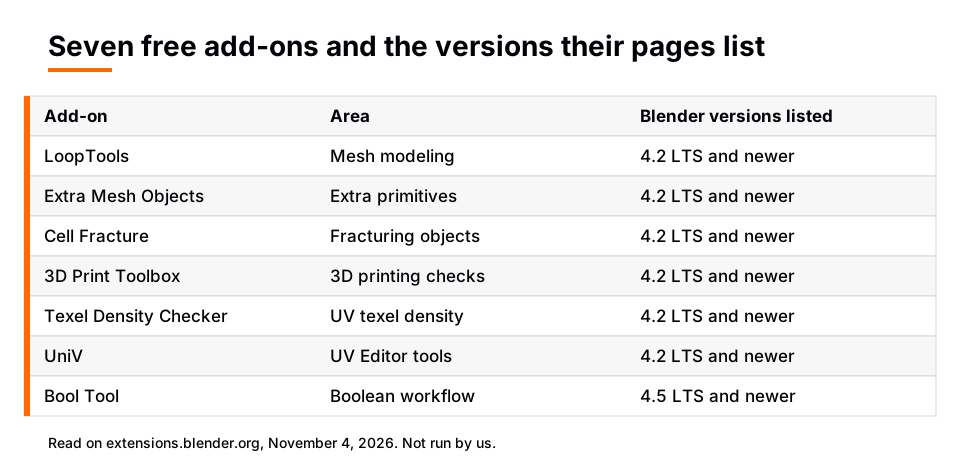
Version support is whatever each page lists. Every add-on below shows "Blender 4.2 LTS and newer" except Bool Tool, which lists 4.5 LTS and newer. The current manual we used is the Blender 5.2 LTS manual.
The seven add-ons
| Add-on and version | What its page says it does | Blender versions listed |
|---|---|---|
| LoopTools 4.7.7 | Mesh modelling toolkit with several tools to aid modelling | 4.2 LTS and newer |
| Extra Mesh Objects 0.4.1 | Adds extra mesh object types under Add > Mesh | 4.2 LTS and newer |
| Cell Fracture 0.2.1 | Fractured object creation, in the Object menu under Quick Effects | 4.2 LTS and newer |
| 3D Print Toolbox 1.5.0 | Utilities for 3D printing: analyze, edit, export | 4.2 LTS and newer |
| Texel Density Checker 2026.1.1 | Toolset for working with texel density | 4.2 LTS and newer |
| UniV 4.0.0 | Smart UV tools for the UV Editor | 4.2 LTS and newer |
| Bool Tool 2.1.0 | Quick Boolean operators and tools for hard surface modeling | 4.5 LTS and newer |
LoopTools
The page calls it a "Mesh modelling toolkit" and lists it in the 3D Viewport sidebar (Edit tab) and the Edit Mode context menu. The page says it was a bundled add-on in Blender 4.1 and is now offered "as it is, with limited support". Our guide to the LoopTools add-on covers its tools and install in detail.
Extra Mesh Objects
This adds extra mesh object types, and the page places it at View3D, Add, Mesh. The page also says it was part of the Blender 4.1 bundled add-ons and is now offered with limited support. Version 0.4.1 adds an Equilateral Grid object according to its What's New section. See our post on the Extra Objects add-on for how it fits into modeling.
Cell Fracture
The page describes it as "Fractured Object Creation" and places it in the Object menu under Quick Effects. Its latest change is a bug fix for annotations after Blender 4.3. Like LoopTools, its page says it was part of Blender 4.1 bundled add-ons and is now offered with limited support.
3D Print Toolbox
The page lists three groups of features. Analyze calculates mesh volume and surface area, checks for bad geometry and fixes it with Make Manifold. Edit includes a Hollow tool, aligning selected faces to the print bed, and scaling to fit boundaries or a volume. Export sends a selection to STL, PLY or OBJ. It asks for the Files permission to export those formats. Version 1.5.0 notes that volume and area statistics now cover all selected objects.
Texel Density Checker
The page says it calculates texel density for different texture sizes, rescales UVs to a target density, copies density between objects, selects faces by density or UV space, and shows density with a checker material and vertex color. It also notes that the Blender Extensions version has no C++ backend. This pairs with how to UV unwrap in Blender when you want even texture detail across a model.
UniV
UniV adds smart UV tools to the UV Editor. The page lists operators such as Stitch, Weld, Unwrap, Relax, Quadrify, Straight, Orient, Sort and Distribute. It asks for the Files permission because it creates and updates icon files in its own directory. The page's 4.0.0 notes call it a major update that fixes numerous operators. One oddity: the What's New date on that page is later than the publish date, so check the version history yourself.
Bool Tool
The page describes a historical add-on that simplifies hard-surface Boolean work by helping you add, manage and apply Boolean modifiers and their cutters, and it says it does not offer a faster Boolean solver. It lists a minimum of Blender 4.5 LTS, while its 2.1.0 notes say it was adapted to Blender 5.2 LTS. If you are new to booleans, read our Blender Boolean guide first.
How to install an add-on from Extensions
The Get Extensions page of the Blender Manual (5.2 LTS) lists three ways to install an extension:
- Install from the website. On the add-on's page, drag the installation URL into Blender.
- Install from Blender. In Preferences, open Get Extensions, search for the extension name and click Install.
- Install from Disk. Use the drop-down menu in the top right of Get Extensions, or drag and drop the extension .zip into Blender. The manual says this installs into a Local Repository and no updates will be available.
Once installed, an extension can be disabled or re-enabled in the user preferences. The Add-ons page says you check or uncheck the box to the right of an add-on, and that some add-ons have their own preferences in the add-on's information box. If an add-on does not activate, check the Console window for errors.
The manual also says you need to check manually for updates, and an Update All button appears when updates are found. The Get Extensions filter can show only Add-ons, so themes do not clutter the list.
Sources: Get Extensions page of the Blender Manual · Add-ons page
Skip the node wiring with the Material & Lighting Vault
The add-ons above handle modeling, UVs and printing. For materials and lighting, the Material & Lighting Vault is a paid Blender 5.2+ extension (the Metalight tab in the N panel) with 1,690 procedural materials: 1,000 core materials in 32 categories plus 690 Pro. They work in Cycles and EEVEE, need no UVs by default (a Use UV option exists) and total about 64 MB.
It also has 200 lighting setups that measure the selected objects and build themselves around them (19 categories, tuned for Cycles), 267 studio lights and 67 weathering presets that work on any material. It is a tool with a personal and commercial license and no redistribution. If you would rather learn Blender in order first, The Blender Launchpad is a roadmap of hand picked, free YouTube lessons, not original video lessons.
Questions people also ask
Where do I find free addons for Blender?
extensions.blender.org is the official platform, and Blender's Preferences has a Get Extensions section that connects to it. The site describes itself as offering free and open source add-ons and themes.
How do I install an add-on in Blender?
Open Preferences, go to Get Extensions, search for the name and click Install. For a downloaded .zip, use Install from Disk or drag the file into Blender, then enable it if needed.
Do these add-ons work in Blender 5.x?
The pages list minimum versions, which are 4.2 LTS or newer for six and 4.5 LTS or newer for Bool Tool. The pages do not list a maximum, but we did not run them, so check each page's version history.
Are Blender add-ons safe?
Each extension page lists the permissions it asks for, such as Files for 3D Print Toolbox. The manual notes extensions can declare permissions like files, network and clipboard, so read the permissions line before you install.
How we checked this
We read these pages on November 4, 2026: the extensions.blender.org front page and the pages for LoopTools, Extra Mesh Objects, Cell Fracture, 3D Print Toolbox, Texel Density Checker, UniV and Bool Tool. We also read the Blender Manual (5.2 LTS) Get Extensions and Add-ons pages and the Getting Started page for creating extensions, which lists the permission options.
We did not run any of the add-ons. We left out ratings, download counts and any claim about quality, because the pages change daily. We could not confirm which add-ons are tested on Blender 5.x beyond the minimum versions their pages list.