The Musgrave Texture node is gone from current Blender. The manual says it "was replaced by the Noise Texture node, which includes all the same functionality", so you now pick the old Musgrave types (fBM, Multifractal, Hybrid Multifractal, Ridged Multifractal and Hetero Terrain) from the Type menu of the Noise Texture node. The change shipped in Blender 4.1, and Blender 5.x keeps it.
This guide explains what the manual and the release notes say about the change, how to rebuild a Musgrave setup with the Noise Texture node (including the two input conversions the manual gives), what each type does, and what to watch for with noise. It uses the Blender 5.2 LTS manual and the Blender 4.0 and 4.1 manuals for the before and after.
What happened to the Musgrave Texture node
The current Musgrave Texture Node page in the manual is now only a short note. It says the Musgrave texture node was replaced by the Noise Texture node, which includes all the same functionality, and gives two conversion rules. The note itself does not name a Blender version. To find the version, we compared the manuals for each release and read the release notes.
| Source | What it shows | Meaning |
|---|---|---|
| Blender 4.0 manual | Full Musgrave Texture page with a Type property; Noise Texture page has no Type property | Two separate nodes |
| Blender 4.1 manual and 4.1 release notes | Musgrave page is the replacement note; release notes say "Musgrave texture replaced with Noise" | Merged in 4.1 |
| Blender 5.2 LTS manual | Same replacement note; Noise Texture has the Type property | Still merged |
The Blender 4.1 release page repeats the manual's sentence under its shading changes. So if a tutorial uses a Musgrave Texture node, it was made for Blender 4.0 or earlier. In the latest manual the replacement note sits on the Geometry Nodes Musgrave page, and the separate shader-node Musgrave page is no longer there.
Sources: Musgrave Texture Node page · Blender 4.1 release page
How to get Musgrave in the Noise Texture node
- Add a Noise Texture node in the Shader Editor (or the Geometry Nodes editor, which has its own Noise Texture node).
- Set Dimensions to 1D, 2D, 3D or 4D. The manual says higher dimensions mean higher render time, so use the lowest that works. 3D uses the Vector input, and 4D adds the W input.
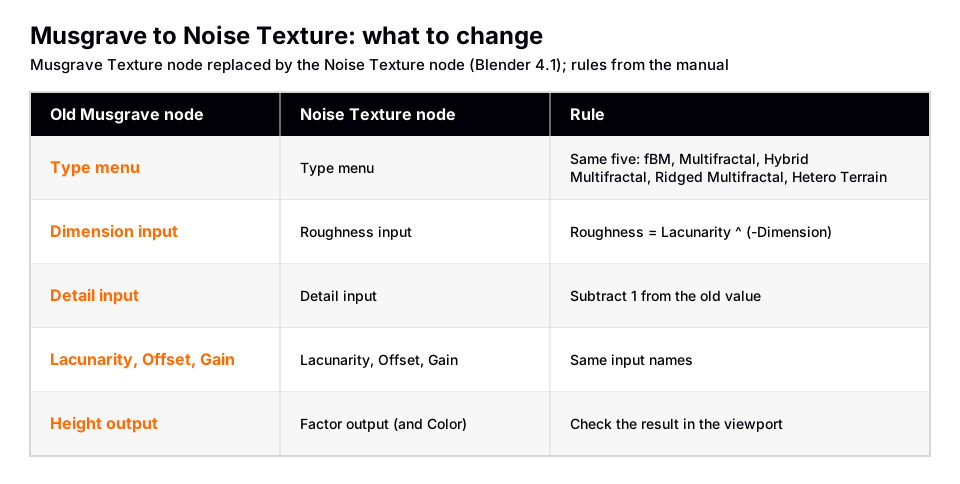
- Choose the Type. It offers fBM, Multifractal, Hybrid Multifractal, Ridged Multifractal and Hetero Terrain, the same five types the 4.0 Musgrave page lists.
- Set Scale, Detail, Lacunarity, Offset and Gain. These keep the names they had on the Musgrave node. The manual says the inputs are dynamic: some appear only for certain properties.
- Convert Dimension to Roughness. The manual says the old Dimension input was replaced by a Roughness input, where Roughness = Lacunarity-Dimension.
- Subtract 1 from the old Detail value. The manual says the Detail value must be subtracted by 1 compared to the old Musgrave Texture node.
- Use the Factor output. The old node's output was called Height. The Noise Texture node's outputs are Factor (the value of the fractal noise) and Color, and the manual does not map Height to Factor by name, so check the result.
Roughness = Lacunarity ^ (-Dimension)
        Detail (Noise Texture) = Detail (old Musgrave) - 1
As an arithmetic illustration of the manual's formula, an old setup with Dimension 2 and Lacunarity 2 gives Roughness = 2-2 = 0.25. An old Detail of 5 becomes 4. The manual does not give a reason these values were chosen, and we cannot confirm that a converted node matches the old node pixel for pixel. Compare them in the viewport.
What the manual does not say is what Blender does when it opens an old file that contains a Musgrave node. The manual does not state it, so open such a file, look for the Noise Texture node that stands in for it, and check the Type, Roughness and Detail values against the conversion above.
What each Noise Texture type does
The Noise Texture node page describes the node as evaluating a fractal Perlin noise at the input texture coordinates, either as a single evaluation or by combining several octaves, which are layers with finer detail. The Type decides how the octaves combine.
| Type | How octaves combine | Look, per the manual |
|---|---|---|
| fBM | Values added together | Homogeneous and isotropic |
| Multifractal | Values multiplied together | More uneven, varying by location, like real terrain |
| Hybrid Multifractal | Addition and multiplication | Peaks and valleys with different roughness, like mountains rising from plains |
| Ridged Multifractal | Absolute value of the noise, flipped upside down | Sharp peaks, with "canyons" |
| Hetero Terrain | Like Hybrid Multifractal | Heterogeneous terrain with the likeness of river channels |
The page also has example renders of each type with the same parameters, so open it if you want to see the difference before you pick one.
Sources: Noise Texture node page
Settings that are easy to miss
- Detail is the number of octaves. It can have a fractional part: the manual says a Detail of 2.5 results in a 50% blend between 2 and 3 octaves.
- Roughness blends between a smoother noise pattern and a rougher one with sharper peaks.
- Lacunarity is the difference between the scale of each two consecutive octaves. Larger values give larger scale for higher octaves.
- Distortion is an amount of distortion. The old Musgrave node did not list this input.
- Normalize fBM. If enabled, output values stay between 0.0 and 1.0. If disabled, the range is at most -(Detail + 1) to Detail + 1, smaller if Roughness is below 1. A converted setup that looks too bright or too dark may be a normalization difference, so toggle it.
Why noise looks wrong
The manual describes two problems that are not bugs, and they matter for terrain and wood-like patterns.
- A flat, constant value. Evaluating noise at integer multiples of the reciprocal of the scale always gives 0.5. Objects placed on a whole-number grid, with the noise sampled at their locations, all get 0.5. The manual's fixes: change the scale, add an arbitrary offset to the coordinates, or evaluate at a higher dimension and adjust the extra one. For truly random per-object values, it recommends the White Noise Texture.
- Banding. Planar surfaces slightly tilted along one axis can show bands of high and low contrast. The manual says the easiest fix is to rotate the coordinates by an arbitrary amount.
If the pattern does not line up with your object at all, the cause is usually the coordinates. The manual says Vector defaults to Generated texture coordinates when the socket is not connected. For placement, see Blender texture UV mapping. For where this node fits among other shader nodes, see Blender material nodes explained, and for the Geometry Nodes version, Blender Geometry Nodes. The Geometry Nodes Noise Texture is ported from the shader node and accepts field inputs.
Skip the node wiring with the Material & Lighting Vault
If you were using Musgrave to make rock, ground or worn surfaces, you do not have to build the noise network yourself. The Material & Lighting Vault is a Blender 5.2+ extension (a Metalight tab in the N panel) with 1,690 procedural materials: 1,000 core materials in 32 categories plus 690 Pro. They work in Cycles and EEVEE and need no UVs, since they use object coordinates by default (a Use UV option exists). The set totals about 64 MB.
Its 67 weathering presets (rust, moss, snow, soot, cracks, edge wear) work on any material, including your own, so a Noise Texture based material you built can still get weathering on top. The Vault is a tool, not a course.
To learn how texture nodes feed a material from the beginning, The Blender Launchpad is a curated roadmap of free YouTube lessons, with a UV and PBR texturing stage; it is a playbook, not original video lessons.
Questions people also ask
Where is the Musgrave Texture node in Blender?
It no longer exists as a separate node. The manual says it was replaced by the Noise Texture node, which includes all the same functionality.
Which Blender version removed the Musgrave Texture node?
Blender 4.1. The 4.0 manual still has the full Musgrave page, the 4.1 manual page is the replacement note, and the Blender 4.1 release notes list the change.
How do I use the Musgrave types now?
Add a Noise Texture node and use its Type menu: fBM, Multifractal, Hybrid Multifractal, Ridged Multifractal or Hetero Terrain.
How do I convert an old Musgrave setup?
Convert Dimension to Roughness with Roughness = Lacunarity^(-Dimension), and subtract 1 from the old Detail value, as the manual states.
Can I still use the Musgrave node in an older Blender?
Yes, in Blender 4.0 and earlier, whose manuals document it. Files that use it were made for those versions.
How we checked this
We did not run Blender for this guide. We read these pages on November 4, 2026, and wrote only what they state:
- Blender Manual (5.2 LTS), read November 4, 2026: Noise Texture node, Geometry Nodes Musgrave Texture node note, Geometry Nodes Noise Texture node.
- Blender Manual 4.0 and 4.1, read November 4, 2026: the Musgrave Texture node page and the Noise Texture node page of each version.
- Blender 4.1 release page on blender.org, read November 4, 2026: the shading and rendering notes about Musgrave.
The manual's replacement note does not name the version, so the 4.1 attribution comes from the version-specific manuals and the release page. We could not confirm what Blender does automatically with old files that contain a Musgrave node, or that converted setups render identically.