To make a glass material in Blender, add a material, select the Principled BSDF node, set Metallic to 0, set Transmission › Weight to 1 and set Roughness to 0. The IOR default of 1.5 is already a good approximation for glass, according to the Blender manual. In Cycles that gives you working glass. In EEVEE you also change two material settings, covered below.
This guide shows the full Blender glass material setup step by step, the alternative Glass BSDF node, how to make frosted, colored and thin window glass, and how glass behaves differently in EEVEE and Cycles. It follows the Blender 5.2 LTS manual, so menu names are for Blender 5.x.
How to make a glass material in Blender
- Select the object and open the Material Properties tab in the Properties editor. Click New if the object has no material.
- Open the Shading workspace. Its Shader Editor shows the material's nodes, and its 3D Viewport can use Material Preview or Rendered shading, as the manual describes.
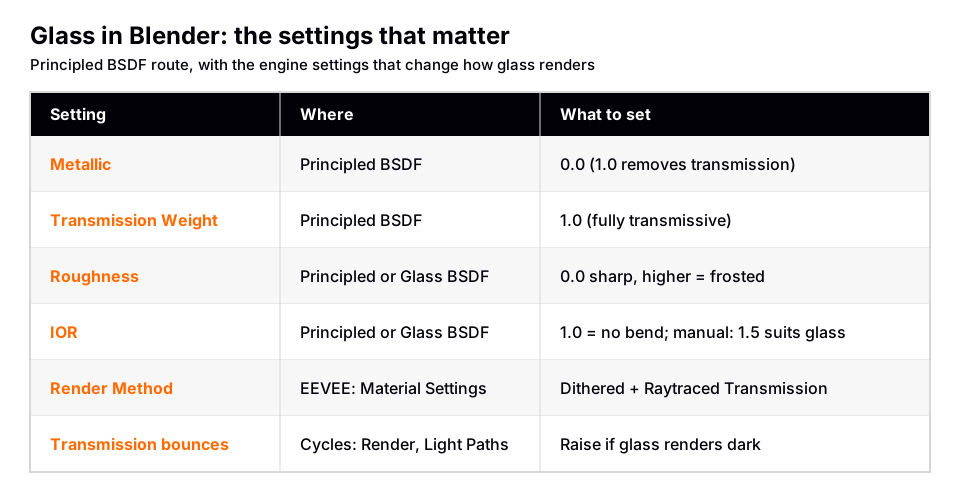
- Select the Principled BSDF node and set Metallic to 0.0. The manual says a Metallic of 1.0 gives a reflection with no diffuse reflection or transmission, so any metal value above zero works against glass.
- Open the Transmission panel on the node and set Weight to 1.0. The manual defines this as a mix between a fully opaque surface at zero and a fully transmissive one at one.
- Set Roughness to 0.0. The manual says 0.0 gives a perfectly sharp reflection (and sharp refraction), and higher values soften both.
- Check IOR. The default is 1.5. The manual says that for most materials IOR sits between 1.0 and 4.0, and that 1.5 is a good approximation for glass.
- Check Base Color. The manual says Base Color is used for diffuse, subsurface, metal and transmission. White keeps the glass clear. A color tints the light that passes through.
You should now see a clear, bending, reflective surface in Cycles. In EEVEE the glass can look flat or dark until you finish the next section.
Glass in EEVEE: the settings that make it work
The manual says EEVEE shares the node system with Cycles but not every feature. Glass is where you notice it, because EEVEE is a real-time engine that approximates refraction. Three settings control the result.
- Render Method. In Properties › Material › Settings, Dithered is the render method that works with raytracing and render passes. Blended allows colored transparency, but the manual says it is incompatible with render passes and raytracing.
- Raytraced Transmission. With Dithered selected, this checkbox uses raytracing to find the transmitted color instead of using only light probes. The manual notes it stops the surface from contributing to the lighting of surfaces that do not use the setting.
- Raytracing. The Render › Raytracing panel sets how rays find the scene. Screen-Trace traces against the screen depth buffer and falls back to light probes if the ray leaves the view. Light Probe uses manually placed probes and has the lowest cost.
With Dithered, the manual explains that materials are rendered in layers, and each layer can only transmit light from previous layers. If nothing is found below, transmissive shaders fall back to light probes. That is why glass in front of glass behaves oddly in EEVEE, covered under limits below.
Thickness: solid glass versus a window pane
EEVEE approximates the inside of an object with a Thickness value, used by refraction and subsurface effects. You set it in Properties › Material › Thickness or through the Thickness input of the Material Output node. If nothing is connected, EEVEE uses a default based on the smallest dimension of the object. A value of zero treats the object as having a single interface.
The Thickness Mode setting chooses the model. Sphere suits rounder objects. Slab suits flat or thin objects such as glass panels, per the manual. The manual also warns that refraction will not refract objects inside the thickness distance.
Glass in Cycles: bounces and caustics
Cycles is a path tracer, so the Principled BSDF refracts light physically. Two things matter for glass.
- Transmission bounces. In Render › Light Paths › Max Bounces there are separate limits for Total, Diffuse, Glossy, Transmission, Volume and Transparent bounces. The Cycles noise page in the manual says transmission shaders such as glass usually need the most bounces. If the glass looks dark or black, the paths are being cut off before they exit.
- Caustics. The Glass BSDF page says glass tends to cause noise due to caustics, and that the Cycles path tracer is not very good at rendering them. Under Light Paths › Caustics you can turn off Reflective and Refractive caustics. Turning them off removes the noise but also removes that light, so glass shadows can become too dark.
The manual describes a fix for the dark shadows: build a shader that uses a Glass BSDF when the glass is viewed directly and a Transparent BSDF when it is viewed indirectly, using the Light Path node to choose between them. The Transparent BSDF lets shadow rays find lights straight through the surface and gives properly colored shadows, without the caustics. It is a trade: you give up caustics to get clean renders. For more on choosing an engine, see EEVEE vs Cycles.
The Glass BSDF node versus the Principled BSDF
The Glass BSDF is a single-purpose shader. The manual says it mixes refraction and reflection at grazing angles. Its inputs are Color, Roughness, IOR and Normal. The Distribution list offers GGX, Multiscatter GGX and, in Cycles only, Beckmann. Multiscatter GGX accounts for multiple scattering between microfacets, which the manual says gives more energy-conserving results and avoids excessive darkening.
| Node | Good for | Notes from the manual |
|---|---|---|
| Principled BSDF | Glass that also needs a coat, thin wall or textured maps | Transmission is one layer of a larger shader; Thin Wall mode exists |
| Glass BSDF | Plain glass, fast to set up | Color, Roughness, IOR, Normal; Thin Film is Cycles only |
| Refraction BSDF | A building block for custom glass | Best mixed with a glossy node using a Fresnel factor |
The Refraction BSDF page says that on its own it gives quite dark results at the edges for glossy refraction. Its advice is to mix it with a glossy node using a Fresnel factor in a Mix Shader. The Fresnel node page describes exactly that as the simple glass recipe: at grazing angles more light is reflected than refracted, as in reality. If you want a deeper look at how nodes feed each other, read Blender material basics.
Frosted, colored and thin glass
- Frosted glass. Raise Roughness. The Glass BSDF page says higher values give smoother refraction. You can also drive Roughness with a texture for uneven frosting.
- Colored glass. Use Base Color on the Principled BSDF or Color on the Glass BSDF. The manual describes Glass BSDF color as the probability that light is transmitted for each wavelength. Keep it light; dark colors transmit little.
- Cloudy or tinted volume. The manual notes that a volume shader can be combined with a surface shader for materials like cloudy glass, and lists a Volume Absorption node among the shaders.
- Window panes and sheets. Enable Thin Wall on the Principled BSDF. The manual says it suits thin structures such as paper, leaves and window sheets. In EEVEE, set the material Thickness to 0 and Thickness Mode to Slab when using thin-walled mode.
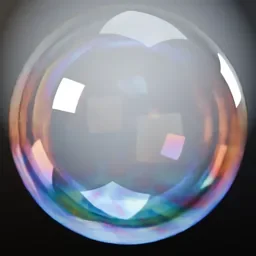
- Iridescent glass coatings. The Thin Film panel, Cycles only, simulates interference like oil films, soap bubbles or glass coatings. The interference is strongest at thicknesses of roughly 100 to 1000 nanometers, per the manual.
For liquids like water, the same Transmission approach applies with different shapes and IOR. We do not cover those here. For clear materials that are not refractive, see the Blender transparent material guide.
Why your glass looks black, flat or noisy
- Glass renders black or dark. Raise the Transmission bounces in Cycles. In EEVEE, check that Render Method is Dithered and that Raytraced Transmission is on.
- Glass looks like a flat gray shape. Glass mostly shows what is around it. With nothing to reflect or refract, there is little to see. A good environment helps, so try an HDRI as described in how to use an HDRI in Blender.
- Fireflies and noise in Cycles. Caustics. Use the Light Path trick above, turn off Refractive caustics, or raise Roughness slightly. The manual also lists Filter Glossy as a way to reduce noise at some cost in accuracy.
- Second pane looks wrong in EEVEE. The EEVEE limitations page says only one refraction event is correctly modeled, and an approximation of the second can be made with the Thickness workflow. It also says only Dithered materials not using raytraced refraction can be refracted.
- Glass is not see-through in an alpha render. The Cycles manual says transmission BSDFs other than the Transparent BSDF are considered opaque, because they change the light direction, so they cannot be used for alpha-over compositing. See how to render a transparent background in Blender.
- Mixing Diffuse and Refraction in EEVEE is noisy. The EEVEE limitations page lists this combination as more noisy than others.
Skip the node wiring with the Material & Lighting Vault
Getting glass right means choosing a node, a render method and a set of engine settings. The Material & Lighting Vault is a Blender 5.2+ extension that gives you ready-made procedural materials, including glass categories, from the Metalight tab in the N panel. The set has 1,690 procedural materials: 1,000 core materials in 32 categories plus 690 Pro.
The materials work in Cycles and EEVEE and need no UVs, since they use object coordinates by default (a Use UV option exists). The whole set totals about 64 MB. If your glass needs wear, the Vault also has 67 weathering presets (rust, moss, snow, soot, cracks, edge wear) that work on any material, including your own, and 267 studio lights if you want a controlled reflection setup for glass products. The license covers personal and commercial use, without redistribution. It is a tool, not a course.
Questions people also ask
How do I make a glass material in Blender?
Create a material, then on the Principled BSDF set Metallic to 0, Transmission Weight to 1 and Roughness to 0. Leave IOR at 1.5. In EEVEE, set the material Render Method to Dithered and enable Raytraced Transmission.
What IOR should a Blender glass material use?
The manual says the Principled BSDF default of 1.5 is a good approximation for glass. It also says IOR 1.0 lets rays pass straight through like transparent, and higher values bend rays more.
Should I use the Glass BSDF or the Principled BSDF for glass?
Both work. The Glass BSDF is simpler and has just Color, Roughness, IOR and Normal. The Principled BSDF adds Thin Wall, coat, textured inputs and other layers in one node.
Why is my Blender glass material not transparent?
Usually Transmission Weight is still 0, Metallic is above 0, or Base Color is not white. In EEVEE also check the Render Method. The manual says only pure white makes a Glass BSDF fully clear.
How do I make frosted glass in Blender?
Raise Roughness on the glass shader. Roughness 0.0 is perfectly sharp, and higher values scatter the refraction and make the glass look frosted.
How we checked this
We did not run Blender for this guide. We read these pages on November 4, 2026, and wrote only what they confirm:
- Blender Manual (5.2 LTS), read November 4, 2026: Principled BSDF, Glass BSDF, Refraction BSDF, Transparent BSDF, Fresnel node, Mix Shader, Material Output node, EEVEE Material Settings, EEVEE Raytracing, EEVEE Limitations, Cycles Light Paths and Cycles Reducing Noise.
The manual gives no IOR table for specific materials such as water, so we give none. We also could not confirm differences between Blender 4.x and 5.x for these nodes, and we did not confirm the exact wiring of the Light Path trick beyond the manual's description.