Blender lighting add-ons fall into three groups: rig builders that place lights for you, light managers that make placing and editing lights faster, and camera-and-exposure toolkits such as the Photographer add-on. Which one fits depends on whether you want a finished rig around your object, faster control of lights you place yourself, or photographic units and camera tools.
This comparison uses only what each add-on's own page says, with the date we read it. We did not install or test any of them. If you are new to lights themselves, read our Blender lighting guide first, then come back.
Lighting in the Material & Lighting Vault
The Material & Lighting Vault is a Blender 5.2+ extension, found in the Metalight tab in the N panel. For lighting it has 200 setups in 19 categories that measure the selected objects and build themselves around them, tuned for Cycles. It also has 267 studio lights: softboxes, beam profiles, gobos and colored light textures.
It is a tool, not a course, and it adds 1,690 procedural materials and 67 weathering presets alongside the lighting. The license covers personal and commercial use, with no redistribution, and it is one payment. Because it requires Blender 5.2 or newer, it is not an option on older builds.
Blender lighting add-ons compared at a glance
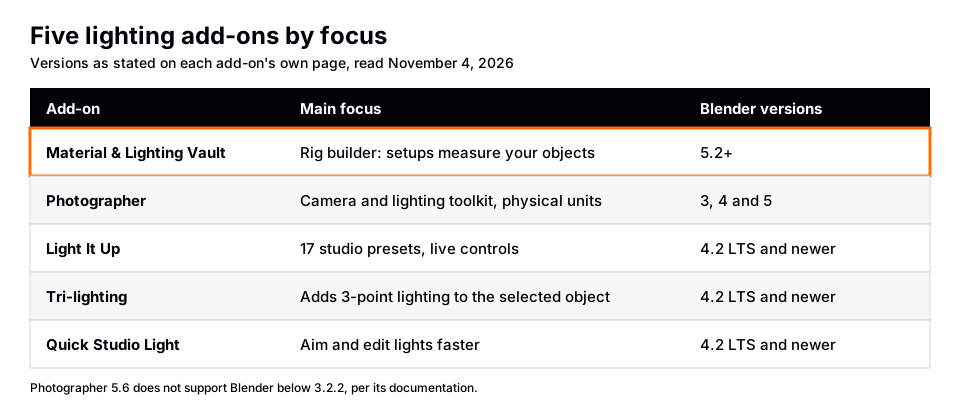
Each row is paraphrased from the add-on's own page, read on November 4, 2026.
| Add-on | What its own page says | Blender versions |
|---|---|---|
| Material & Lighting Vault | 200 lighting setups that measure selected objects, 267 studio lights, tuned for Cycles | 5.2+ |
| Photographer | Camera and lighting toolkit: physical lights, light mixer, world mixer, camera tools | 3, 4 and 5 (5.6 needs 3.2.2 or newer) |
| Light It Up | 17 studio lighting setups with live controls, Fit To Subject | 4.2 LTS and newer |
| Tri-lighting | Adds 3-point lighting to the selected or active object | 4.2 LTS and newer |
| Quick Studio Light | Aim lights at what you hover over, edit light parameters in a panel | 4.2 LTS and newer |
Photographer add-on: what its documentation says
Many people search for the "Blender Photographer add-on" or "Photographer addon". Its own documentation site (Photographer 5), read November 4, 2026, describes it as an add-on that vastly expands your camera and lighting toolset. This is what the page lists.
- Lighting: Physical Lights with photometric intensities and color temperature controls, a Light Placement Modal with light targets, Light Gobo and IES textures (Cycles only), a World Mixer for sky lighting and HDRIs, a Light Mixer for an overview of scene lights, and an Emissive Mixer for emissive materials.
- Camera: a camera list, physical exposure controls (shutter speed, shutter angle, aperture, ISO), white balance, autofocus tools, lens shift, bokeh and vignetting textures, and camera post effects.
- Rendering: a Render Queue manager that renders cameras in sequence.
- Versions and engines: the page says it is for Blender 3, 4 and 5, that Photographer 5.6 does not support Blender below 3.2.2, and that it supports EEVEE and Cycles, with some features unavailable in EEVEE because of technical limitations. LuxCore is no longer supported in version 5.
The installation page says you install it from the zip file you downloaded from Gumroad, using Install from Disk in Preferences under Get Extensions (Blender 4.2 and newer), or by dragging the zip into the Blender window. It does not mention Blender Market or the Blender Extensions platform as download sources, and neither documentation page we read showed a price. Check the Gumroad page for the current price and license terms. When we searched Blender Extensions for "photographer", it did not return this add-on.
The difference from a rig builder is the focus. Photographer centers on real-world camera and light units and on managing cameras and lights you create. A rig builder such as the Vault or Light It Up focuses on creating a lighting setup around your subject. Some people use both kinds.
Lighting add-ons on Blender Extensions
The Blender Extensions site has a Lighting tag. These are the add-ons we read, from their own pages on November 4, 2026.
- Light It Up: its tagline is studio lighting presets you can adjust afterwards. The page lists 17 setups in Portrait, Cinematic, Environment and Product categories, four live controls (Intensity, Temperature, Key/Fill, Orbit), Fit To Subject, custom preset saving, and Cycles and EEVEE support. Version 4.0.0 is listed, and the license is GPL 3.0 or later.
- Tri-lighting: adds 3-point lighting to the selected or active object. The page says it was part of the Blender 4.1 bundled add-ons and is now offered as it is with limited support.
- Quick Studio Light: Lighting Mode (Shift+R) aims a light at the area you hover over, and a Light Parameters panel edits light settings. Version 1.2.2 is listed.
The tag page also lists, by name and one-line description, Light Painter (paint lights instead of placing them), HDRI Rotator (move and rotate HDRIs, shadows and lights from the viewport), Sun Position, Dynamic Sky (a procedural sky for Cycles and EEVEE), Light Helper (light and world environment linking from the sidebar), QLE (adds a basic lighting setup to a scene) and Lumos. We did not open those pages, so check each one for versions and limits before installing.
Sources: Light It Up · Tri-lighting · Quick Studio Light
How to choose a lighting add-on
- Check your Blender version first. The table above shows the minimums each page states.
- Decide what you need. A finished rig around a product, faster editing of your own lights, photographic units, or only a quick three-point start each point to a different tool.
- Check the render engine. The manual says shader-node lights are Cycles-only and EEVEE ignores light node trees. Photographer's own page notes Gobo and IES textures work in Cycles only.
- Test on your own scene. Compare a rig built by hand (see our studio lighting scene guide) with what an add-on produces.
- Read the license. Extensions on the Blender site list GPL 3.0 or later, which is different from a paid tool's terms. If you are weighing a paid pack, what to look for in a lighting pack has a checklist.
If you are still learning why lights behave as they do, our Blender HDRI guide covers the other half of lighting, the world. And The Blender Launchpad teaches studio lighting and rendering in Cycles and EEVEE through hand picked, free YouTube lessons in order. It is a curated roadmap, not original video lessons.
Questions people also ask
What is the Photographer add-on for Blender?
According to its own documentation, it is a camera and lighting toolkit for Blender 3, 4 and 5 with physical lights, a light mixer, a world mixer, camera exposure controls and a render queue. Installation uses a zip downloaded from Gumroad.
Is the Blender Photographer add-on free?
The documentation pages we read did not show a price. They point to Gumroad for the download, so check the Gumroad page for current terms. The Blender Extensions search did not list it.
What is the best lighting add-on for Blender?
It depends on the job. We do not rank them. Photographer suits camera and physical light units, Light It Up and the Vault build rigs around a subject, and Tri-lighting adds a three-point setup. Match the tool to your Blender version and render engine.
Do I need an add-on for lighting in Blender?
No. Blender's built-in Point, Sun, Spot and Area lights and the world cover most work. Add-ons save time on repeated setups.
How we checked this
We did not install or run any add-on. We read these pages on November 4, 2026:
- Photographer 5 documentation (home and installation pages) for features, versions, engines and the download source.
- Blender Extensions: the Lighting tag page, and the pages for Light It Up, Tri-lighting and Quick Studio Light. We also searched the Extensions site for "photographer".
- Blender 5.2 LTS Manual: Light Settings (Cycles) for the shader-node light limits.
The Gumroad product page did not load for us, so we state no price for Photographer. The tag page gave no version information for the add-ons we did not open, so we make no version claims for them. We did not test or rank any add-on.